

The GPT Store is the OpenAI Marketplace integrated with ChatGPT where you can discover, use, and publish custom AI assistants (GPTs) without any programming skills. Launched in January 2024, it functions as a App store for artificial intelligence. Since GPT-5 arrived in August 2025 and agentic workflows emerged, the GPT Store has become an essential tool for Automate tasks, analyze data, and boost productivity.
ChatGPT is part of your daily life, but you probably still use the basic model for everything. You type your prompts by hand, rephrase them three times to get the right result, and start over with each new conversation. It's like using a smartphone without ever installing a single app.
The GPT Store is a game-changer. Instead of starting from scratch each time, you access pre-configured and specialized assistants for specific tasks: data analysis, image generation, writing, programming, education. And if no GPT matches your needs, you can create yours in minutes, without writing a single line of code.
This guide covers everything: from accessing the GPT Store to creating your own GPT, including the best GPTs to use in 2026 and strategies for getting the most out of this platform.
What is OpenAI's GPT Store?
The GPT Store is a marketplace (marketplace) integrated directly into the ChatGPT interface. It allows any user to:
- Discover thousands of GPTs created by other users and by OpenAI.
- Use these specialized assistants directly in ChatGPT.
- Create their own custom GPTs.
- Publish so GPTs for others to use.
The concept is simple: if ChatGPT is the operating system, the GPT Store is the App Store. Each GPT is a custom version of ChatGPT with specific instructions, pre-loaded knowledge, and sometimes action capabilities (web browsing, code execution, image generation).
The history of the GPT Store
| Date | Event |
|---|---|
| November 2023 | OpenAI Announces Custom GPTs (Sam Altman, DevDay) |
| January 2024 | Official launch of the GPT Store |
| 2024 | Explosion in the number of GPTs (3+ million published) |
| May 2024 | GPT-4o becomes the default model in ChatGPT |
| August 2025 | GPT-5 replaces GPT-4o as the default model in ChatGPT |
| December 2025 | GPT-5.2 available in ChatGPT |
| March 2026 | GPT-5.4 available in ChatGPT |
Who can access the GPT Store?
Access depends on your ChatGPT subscription:
- ChatGPT Free Limited access to the GPT Store. You can use some GPTs but with volume restrictions.
- ChatGPT Plus (20 $/month): full access to the GPT Store, GPT creation, unlimited usage.
- ChatGPT Team : Full access + shared GPTs within the team workspace.
- ChatGPT Enterprise / Edu Full access + administrative controls + enhanced data protection.

Be quoted by ChatGPT, Perplexity, and Gemini
60%: Some searches don't require a click. You are selected by AI.
How to access the GPT Store and find GPTs
Access the store
- Log in to ChatGPT (chatgpt.com or the mobile app).
- In the left-hand sidebar, click on «Explore GPTs» (or «Explore GPTs» in English).
- The GPT Store opens with featured GPTs, most popular, and categories.
GPT Store Categories
The store is organized into Thematic categories :
- Featured OpenAI's curated selection of quality, validated GPTs.
- Trends The most used GPTs right now.
- By OpenAI Official GPTs created by the OpenAI team (DALL-E, Data Analyst, etc.).
- Writing writing assistants, copywriting, proofreading.
- Productivity Automation, project management, analysis.
- Research and analysis data processing, study synthesis.
- Programming Development, debug, code review.
- Education tutors, learning, exercises.
- Lifestyle : cuisine, travel, wellness.
Use the Search bar to find a specific GPT by name or function.
The Best GPTs in the GPT Store in 2026
GPTs for Productivity
| GPT | Usage | Why is it useful |
|---|---|---|
| Data Analyst OpenAI | Data analysis, visualizations | Upload an Excel/CSV file, it analyzes it, creates charts, and explains the insights in plain language |
| Canva | Presentation and Visual Design | Create slides and visuals directly from ChatGPT via the Canva API |
| Consensus | Academic research | Synthesis of 200 million scientific articles. Ask a question, it cites the studies. |
| Code Copilot | Development and debugging | Help with writing, correcting, and optimizing code in any language |
| Creative Writing Coach | Writing and storytelling | Detailed feedback on your texts, suggestions for structure and style |
GPTs for Education
- Khan Academy Code Tutor Programming tutor who guides step-by-step without giving the answer directly.
- CK-12 Flex Math and science tutor for high school and college students.
- Language Tutor Language learning with interactive conversations adapted to your level.
GPTs for SEO and Digital Marketing
For SEO and marketing professionals:
- SEO Analyzer Web page analysis and optimization recommendations.
- Keyword Research GPT Keyword list generation with volumes and intents.
- Content Brief Generator Creating structured editorial briefs from a keyword.
- Schema Markup GPT Generating structured JSON-LD markup for SEO.
GPTs lifestyle and daily life
- AllTrails Personalized hiking recommendations based on your location and level.
- Sous Chef Recipe suggestions based on the ingredients you have on hand.
- Plan a trip Custom itineraries with budget, accommodation, and activities.
How to create your own custom GPT?
Creating a GPT does not require no programming skills. Everything is done via a conversational interface in ChatGPT.
The step-by-step creation process
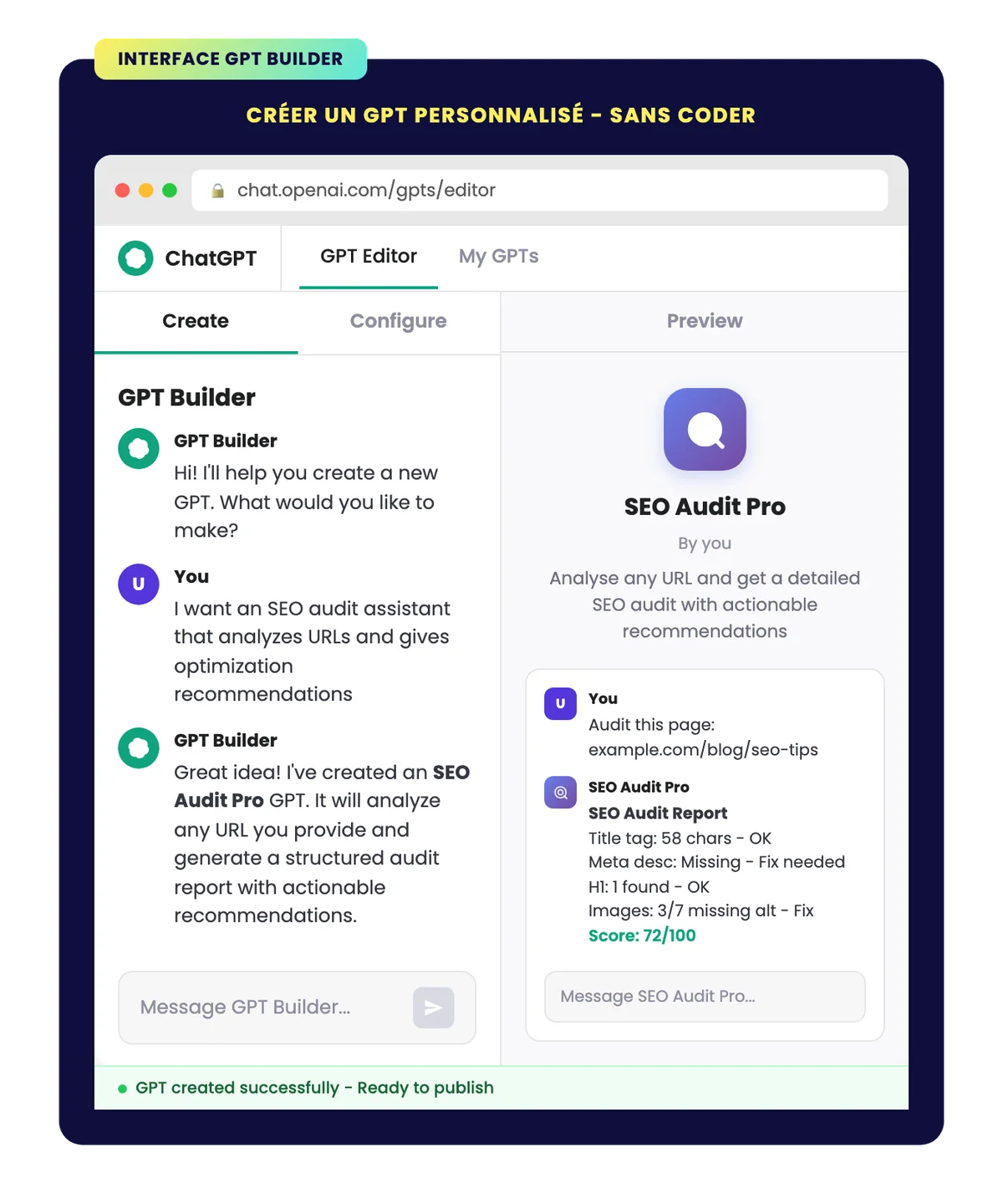
- Access the GPT Builder In the «Explore GPTs» menu, click on «Create a GPT».
- Configure via conversation The GPT Builder asks you questions to understand what you want to create. Describe your assistant in natural language: «I want an assistant that analyzes CVs and provides improvement recommendations.»
- Fine-tune in the Configuration tab :
- Name Your GPT's name as it will appear in the store.
- Description I am a large language model, trained by Google.
- Instructions : the detailed rules of behavior. It is the system prompt that defines how the GPT should respond, what it should do, and what it should avoid.
- Knowledge you can attach up to 20 files (documentation, guides, manuals, database) that the GPT will use as a reference. This is what makes your GPT an expert in a specific field.
- Capabilities : enable or disable web browsing, image generation (DALL-E), code execution (Code Interpreter).
- Actions Connect your GPT to external APIs so it can perform concrete actions (send an email, query a database, etc.).
- Test The right side of the editor displays a real-time preview. Test different queries to verify that the behavior is correct.
- Publish Choose visibility (private, shared link, or public in the store).
Tips for creating an effective GPT
- Precise instructions : The more detailed your instructions, the more reliable the GPT will be. Specify the tone, response format, limitations, and edge cases.
- Relevant knowledge files Upload documents containing the expertise you want to transmit to the GPT. A 50-page guide is better than a 500-word prompt.
- Test the edge cases : try to «break» your GPT with ambiguous or off-topic requests to check that it stays within its scope.
- Iterate A good GPT is built in several rounds of improvement based on real-world usage.
How to publish and share your GPTs on the store?
The conditions for publishing
To share a GPT on the store, you need to:
- Save your GPT with «Everyone» visibility».
- Check Your Creator Profile Go to Settings → Creator Profile. Enter your name (or company name) and your verified website or domain.
- Follow the usage guidelines : Your GPT must comply with OpenAI policies (no offensive content, no fraudulent use, respect for privacy).
Sharing options
- Private Only you can use the GPT. Ideal for personal or internal assistants.
- Shared link accessible to anyone with the link. Ideal for sharing with a team or clients without public publication.
- Public (GPT Store) Visible to all ChatGPT users. Your GPT appears in store search results and can be featured by OpenAI.
How to get featured on the GPT Store?
OpenAI selects GPTs for the «Featured» section based on several criteria:
- Real-world utility GPT solves a concrete, specific problem.
- Quality of answers Well-calibrated instructions, relevant and reliable answers.
- User engagement : number of uses, conversations, positive feedback.
- Verified creator profile A verified domain and a complete profile inspire trust.
The GPT Store as a Business Tool: Concrete Use Cases
For businesses
- Automated customer support A GPT trained on your product documentation can answer frequently asked questions 24/7.
- Employee onboarding A GPT that knows the internal processes, the HR handbook, and the company's tools.
- Data analysis Data Analyst GPT to transform raw Excel files into actionable insights without data skills.
- Content writing : a GPT configured with your editorial charter, your tone of voice, and your brand guidelines.
For freelancers and consultants
- Personal productivity A GPT assistant that knows your processes, your clients, and your templates.
- Enhanced Service Offering : Create a GPT for your clients that automates part of your service.
- Quote/Proposal Generator : a GPT trained on your business proposal models.
For SEO Professionals
The GPT Store offers specific opportunities for SEO:
- Automated SEO Audit : a GPT that analyzes a URL and produces a report of’SEO audit structured.
- Brief generator Create content briefs from a keyword and SERP analysis.
- Internal meshing assistant A GPT that analyzes your sitemap and suggests relevant internal links.
- Tag optimizer Generate optimized title tags and meta descriptions from the page content.
GPT-5 and the Evolution of the GPT Store in 2026
Major changes with GPT-5
Since August 2025, GPT-5 is the default model in ChatGPT, replacing GPT-4o. This change directly impacts GPTs in the store:
- Improved contextual understanding GPT-5 better understands complex instructions, making GPTs more reliable.
- Enhanced creativity and precision the answers are more nuanced and better adapted to the context.
- Stability in long conversations GPTs no longer «lose the thread» after 20+ messages.
- Native multimodality GPT-5 seamlessly processes text, images, audio, and video.
GPT-5.2, available since December 2025, pushes these capabilities even further with a smoother multimodality and improved performance on reasoning tasks.
Agentic workflows: the future of GPTs
The biggest change in 2026 is the shift from «chat» to Agentic workflow. GPTs are no longer limited to answering questions – they can now:
- Surf the web search for information, browse websites, extract data.
- Clicking buttons and interact with interfaces.
- Run programs Running scripts, manipulating files, automating tasks.
- Chain actions autonomously : create a complete workflow with no human intervention at each step.
This is the transition from «assistant» AI to «agent» AI. A GPT configured with the right instructions and the right actions can now Automate entire workflows which took hours manually.
Limits, Security, and Data Protection
Data Protection
The issue of privacy is crucial, especially for professional use:
- ChatGPT Plus/Free By default, your conversations can be used to train OpenAI models. You can turn this feature off in the settings.
- ChatGPT Team/Enterprise Your data is not never used for training. This is the recommended security level for businesses.
- Files uploaded to a GPT They are stored by OpenAI. Do not share sensitive data (credentials, customer data, financial information) in a public GPT.
Limits to know
- Hallucinations GPTs can invent plausible but false information. Always verify critical data.
- Limited knowledge Knowledge files are the remedy, but GPT can only process a limited volume per conversation.
- No memory between conversations : each new conversation restarts from scratch (unless the «Memory» feature is enabled in settings).
- OpenAI Dependency Your GPT runs on OpenAI's infrastructure. If the service is unavailable, your GPT is too.
The GPT Store transforms ChatGPT from a simple chatbot into an AI app platform. Whether you are a user looking to automate your daily life or a creator who wants to share your expertise, the store offers possibilities that didn't exist two years ago. The key is not to settle for the basic model: Explore, test, and create.