


«We're going to remove content to improve our rankings.» Your boss or client might look at you dubiously! Yet, it's one of the Content strategies the most effective (and underutilized) in SEO.
Improving search engine visibility. Gaining positions on your target keywords. All of this by removing content rather than creating it. That's the content pruning.
I'll explain why it works – I promise, it's very logical. Feel free to send the explanation to your boss or client.
I'll show you how to set up a Content pruning strategy effective. Don't delete your content randomly! And above all, how to implement it without breaking your SEO. Because if done poorly, it can do more harm than good.
TL;DR - The essential points in 30 seconds
- Content pruning consists of removing or improving the low quality content to improve the overall quality of your site
- Google evaluates your site as a whole Zombie pages are dragging down your best pages.
- Before deleting, always check traffic and backlinks in Google Search Console
- Never delete brutally use 301 redirects or a 410 code as appropriate
- Expected result Best crawl budget, PageRank concentration, ranking increase

Lift the technical brakes holding back your SEO
Indexing, speed, JS, schema, crawl: we're unlocking it all.
What is content pruning?
The content pruning (or content pruning) is an SEO technique that involves identifying and addressing outdated, redundant, or low-quality content pages on a website. The term comes from gardening: you prune the dead branches of a tree so that the sap concentrates on the branches that bear fruit.
In SEO, it’s exactly the same principle. You remove pages that aren't performing so that the «SEO juice» (PageRank) concentrates on your important pages. The ones that really generate business.
The three types of content targeted by content pruning
When we talk about content to prune, we generally target three categories:
Zombie pages are indexed pages that haven't generated any clicks for months. They exist, Google knows about them, but no one visits them. According to the concept popularized by Olivier Duffez, if 80% of your pages never generate clicks, the RankBrain algorithm eventually considers your site to be of poor quality.
Orphan pages They receive no internal links. They are isolated within your architecture, which means Google has difficulty crawling them and PageRank does not flow to them. Double whammy.
Thin content Group pages with little added value. Less than 300 words without depth, duplicate content, pages that provide no useful information to the user.
Content pruning vs. content refresh: what's the difference?
Be careful not to confuse the two approaches. The Content refresh consists of updating and improving existing content to make it more effective. The content pruning Go further: we either delete the content altogether or merge it with another page.
The choice between the two depends on the page's potential. A page with backlinks and a relevant topic likely deserves a refresh. A page with no traffic and no backlinks, on a topic nobody is interested in anymore? Head for pruning.
Why does content pruning improve your SEO?
Google does not look at your pages in isolation. It evaluates the Overall quality of your site. This is what is called the «site-wide quality signal». And this is where content pruning makes perfect sense.
The impact on overall perceived quality by Google
Imagine your site as an average. You have excellent pages at 9/10, decent pages at 6/10, and catastrophic pages at 2/10. Your overall average is pulled down by these low-quality pages.
By removing pages with a rating of 2/10, you mechanically increase your average. This makes Google perceive your site as being of better overall quality. And that translates into better rankings, including for your pages that were already good.
Counterintuitive but true: Fewer pages = better SEO? Yes, if those deleted pages were of poor quality.
Crawl budget optimization
Google allocates a crawling budget limited to each site. It's the number of pages Googlebot will crawl in a given period. If you have 10,000 pages and 6,000 are outdated content, you're wasting 60% of your crawl budget.
Pruning frees up this budget so that Google can crawl your important pages more often. Your new content is discovered faster. Your updates are taken into account more quickly. This is particularly critical for large e-commerce sites or media sites with a lot of content.
PageRank redistribution
PageRank gets diluted when it's distributed across too many pages. Every internal link you create to a zombie page is lost SEO juice. By removing these useless pages (or masking them through obfuscation), you refocus PageRank towards the pages that truly matter for your business.
Think of it like an automatic sprinkler. If you water 100 plants and 60 are dead, the 40 living plants receive less water. Cut out the dead plants, and the survivors flourish.
Improving user signals
Low-quality pages generate poor user signals: high bounce rates, short time on page, and pogo-sticking.
By eliminating these problematic pages, you mechanically improve your overall engagement metrics.
How to evaluate content for removal?
This is the most important part. Never delete a page without checking its metrics. I insist: always check before deleting. A hasty deletion can cost you valuable traffic and backlinks.
Performance criteria to analyze
Here are the key metrics to look at in Google Search Console and your analytics tool:
| Metric | Alert threshold | Where can I find the information |
|---|---|---|
| Organic traffic | Less than 10 visits/month over 6-12 months | Google Analytics, Search Console |
| Impressions | Constantly declining or zero | Google Search Console |
| Clicks | Zero clicks in 6+ months | Google Search Console |
| Bounce rate | Greater than 80-90% | Google Analytics |
| Page load time | Less than 30 seconds | Google Analytics |
| Conversions | No conversions assigned | Google Analytics |
Crucial point: Don't rely on a single metric. A page might have low traffic but an excellent conversion rate. In that case, you don't want to delete it. Always look at the big picture.
Content quality criteria
Beyond the numbers, evaluate the intrinsic quality of each page:
- Is the content outdated or inaccurate? An article about «SEO Trends 2019» is no longer relevant in 2025. Outdated information harms your credibility.
- Is the content too short? A page of less than 300 words that brings None Added value is thin content. Google doesn't like that.
- Is there any duplication? If two pages cover the same topic with more than 80% similarity,%, you have a cannibalization problem. One of the two must disappear or merge.
- Is the content off-topic? If you have a gardening website and a random page about cryptocurrencies, it dilutes your theme and harms your topical authority.
Signals to definitely check before deletion
Before deleting anything, be sure to check:
Backlinks: Use Ahrefs, SEMrush, or Majestic to see if the page has backlinks. A quality backlink, even on a page with no traffic, has value. In this case, redirect rather than delete.
Positioning: The page might be on page 2 or 3 for interesting keywords. With optimization, it could climb back up. Deletion = you start from scratch.
The internal mesh: Do other pages link to it? If so, you'll need to update those links after deletion.
Do you want us to analyze your site?
Our SEO experts identify zombie pages that are dragging down your performance and offer you a concrete action plan.
Request a free audit
A clear diagnosis to unlock your growth
Audit technique, semantic, netlinking, and competition with an action plan.
What tools to use for content pruning?
You don't need 15 tools to do good content pruning. Here's my recommended stack, with free alternatives when possible.
Google Search Console: Your Essential (Free) Tool
This is the essential starting point. Search Console gives you direct data from Google about your pages:
- Go to «Performance» and filter by page
- Look at impressions and clicks over the last 12 months
- Identify pages with impressions but zero clicks (bad CTR = bad title or irrelevant content)
- Identify pages with zero impressions (Google doesn't even show them = quality or indexing problem)
Export these data to CSV for easier analysis. You want the list of all your pages with their metrics.
Google Analytics: For User Signals
Analytics gives you visitor behavior once they are on the page: time spent on page, bounce rate, exit pages, attributed conversions.
Cross-reference this data with Search Console data for a comprehensive view.
Screaming Frog: For Technical Audits
Screaming Frog crawls your site like Google and automatically identifies problems: orphaned pages, redirect chains, pages in error 404/.
The free version allows crawling up to 500 URLs, which is more than enough for small websites.
Ahrefs or SEMrush: for backlinks
Before deleting a page, you absolutely must check if it has backlinks. Ahrefs and SEMrush are the go-to tools. If the budget is tight, use the free version of Ahrefs Webmaster Tools, which gives you access to backlinks for your own site.
Manual method with a spreadsheet
You don't need fancy tools to get started. Create a spreadsheet with these columns:
| URL | Impressions | Clicks | Backlinks | Decision |
|---|---|---|---|---|
| /old-article/ | 150 | 2 | 0 | Delete (410) |
| /complete-guide/ | 5000 | 120 | 12 | Preserve |
| /duplicate-article/ | 800 | 15 | 3 | Merge (301) |
How to delete pages without hurting your SEO?
That's where many people fail. In SEO, you never delete a page «wildly.». If you simply delete the page, you'll generate a 404 error. And that's problematic on several levels.
Why are 404 errors problematic
A carelessly deleted page creates a 404 (page not found) error. Here's what happens:
For users: If they've bookmarked the page or click on an old link, they land on an error page. Bad experience.
For backlinks: If the page had inbound links, you lose all the SEO juice they were passing. It's a waste.
For Google: Too many 404 errors send a signal.
The 301 redirect: when and how to use it
Visit 301 redirect is a permanent redirect. It tells Google: «This page has permanently moved to another URL.»
Use a 301 when:
- The deleted page has backlinks that you want to keep
- There is a relevant landing page on the same topic
- You fused two similar contents
Golden rule: redirects to a thematically similar page. A 301 redirect from /recettes-chocolat to /politique-de-confidentialite makes no sense and will be ignored by Google.
The 410 status code: when and how to use it
The 410 Gone means «Gone.» It tells Google, «This page is no longer here and will never return. Stop looking for it.»
Use a 410 when:
- The page has no backlinks
- No relevant page to redirect to.
- The content was truly useless or harmful.
- Do you want Google to quickly deindex the page
The 410 is «cleaner» than a 404 because it explicitly tells Google that the deletion is intentional. Google will stop crawling that URL faster.
Summary: 301 vs 410
| Situation | Action | Why |
|---|---|---|
| Page with backlinks + relevant target page | 301 | You retain the SEO juice. |
| Page with backlinks but no target page | 301 verse category | Better than losing backlinks |
| Page without backlinks, outdated content | 410 | Fast and clean de-indexing |
| Merging two similar articles | 301 | You consolidate authority |

Boost your authority with premium backlinks
Targeted strategy, optimized anchors, measurable ROI.
Decision Framework: Delete, Merge, or Optimize?
Here's a simple decision tree for each page of your audit. Ask yourself these questions in order:
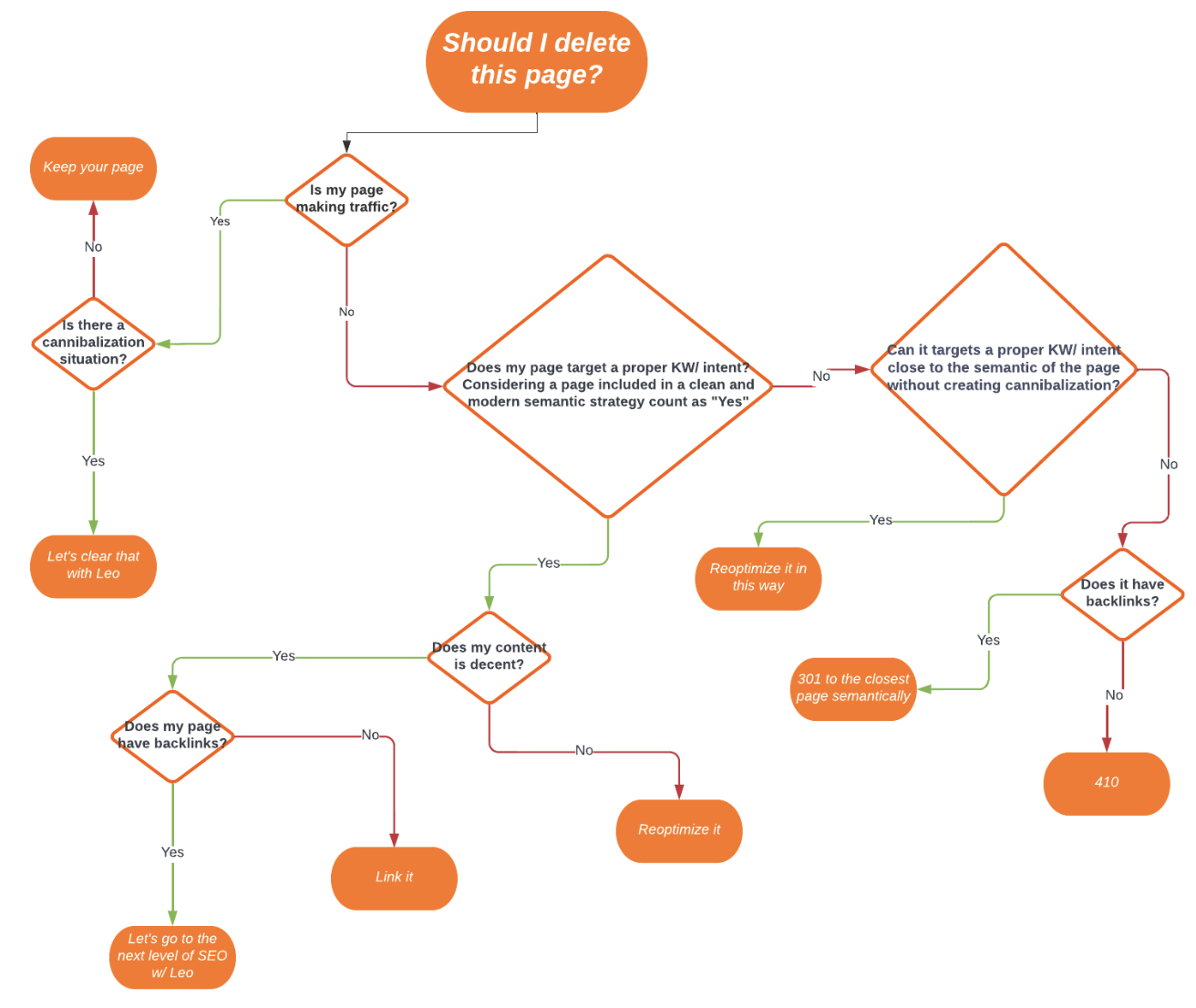
Does the page generate traffic or conversions?
Does the page have quality backlinks?
Is the topic still relevant to your business?
Is there a thematically similar page?
The case of content fusion
Merging is often the best option when you have several articles on the same topic that are cannibalizing each other. Here's how to proceed:
- Identify the best-performing page (more traffic, better backlinks, better ranking)
- She becomes your «master» page»
- Enrich it with the best parts of the other pages
- Redirect merged pages to the master page with a 301
- Update internal mesh
Result: one super complete page instead of three average pages competing with each other.
Fatal errors to avoid
Poorly executed content pruning can do more harm than good. Here are the pitfalls I regularly see people fall into.
Delete without analyzing data
«This page is old, I'm deleting it. Stop. An old page can still generate qualified traffic. Always check Search Console before taking any action.
Ignore backlinks
You're deleting a page that has 15 backlinks from authority sites? You just threw months' (or even years') worth of link building work in the trash.
Make irrelevant redirects
Redirect /recette-tiramisu to /mentions-legales because you don't have another recipe page? Google will understand it's a «soft 404» and ignore it.
Delete everything at once
You identified 500 pages to prune? Don't delete them all on the same day. Go in batches of 20-50 pages to monitor the impact and correct if necessary.
Do not update the internal mesh
You delete a page but leave internal links pointing to it? You're creating broken links. After each session, run a Screaming Frog crawl.
Forget post-pruning tracking
Pruning isn't a one-off. Monitor the evolution of your overall traffic over 4-8 weeks, the positions of your main pages, and crawl errors in Search Console.
Bonus: Implement a content pruning routine
Content pruning is not a one-time action. To keep a site healthy, integrate it into your SEO routine.
The recommended annual audit
Each year, review all of your content. For each page, check:
- Does the content always meet the search intent?
- Is the information up to date?
- Does the page generate traffic or conversions?
- Are there new pages cannibalizing it?
that's what you call being «update proof» resistant to Google updates. A regularly maintained website suffers much less from core updates.
Warning signs to watch out for
Between annual audits, remain attentive to these signs that indicate a spot pruning is necessary:
- Sudden drop in traffic after a Google update
- Increase in zero-click pages in Search Console
- Negative user feedback on certain content
- Discontinued products or services (for e-commerce)
Does your site need content pruning?
Our experts identify the Pages Zombies that are hurting your SEO and provide you with a concrete action plan.
Make an Appointment