


SEO log analysis involves reading Your web server log files to understand exactly which robots visit your site, how often, and what they do there. In 2026, it's no longer just Googlebot you need to monitor: GPTBot, ClaudeBot, PerplexityBot, and the brand new Google-Agent (who interacts with your site like a human) are a game-changer. Specifically, a poorly optimized site can waste up to 60% of its crawl budget On useless URLs. Log analysis is the only source of raw data that shows you the reality on the ground.

Be quoted by ChatGPT, Perplexity, and Gemini
60%: Some searches don't require a click. You are selected by AI.
What is log analysis?
Do you wonder why some of your pages take weeks to get indexed while others appear within a few hours? Or why your strategic content is never cited by ChatGPT or Perplexity? The answer lies in a place that 90% of sites never look at: their server's log files.
SEO log analysis is, more or less, a X-ray of your site as seen by robots. Not the filtered data from Google Analytics, not the samples from Google Search Console. The raw, complete, uncensored data. Every HTTP request, every bot visit, every server response code. That's the only way to know for sure what's happening on your website from a crawl perspective.
And in 2026, the game has clearly changed. Google launched Google Agent, an artificial intelligence bot that no longer just reads your pages: it clicks, navigates and fills in your forms. The bots of ChatGPT, Perplexity and Claude visit strategic sites almost every day. If you don't know what is happening in your logs, you are flying blind. Here is how to see clearly.
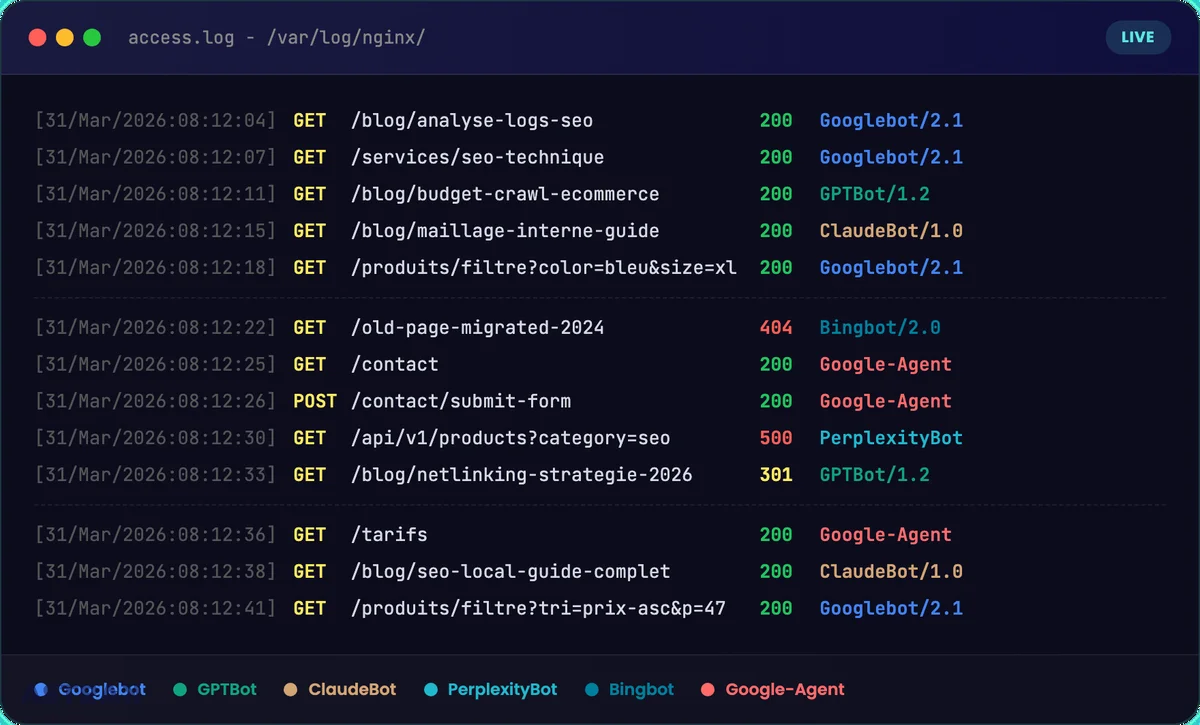
What is a server log file and why read it?
One log file (or log file), this is a text document automatically generated by your web server (Apache, Nginx, IIS). Every time a visitor – human or bot – sends a request to your website, the server records a line with this information:
- The IP address from the visitor
- The date and time exact query
- The requested URL
- The HTTP response code (200, 301, 404, 500…)
- The user agent (the identity of the robot or browser)
- Server response time Time to First Byte
Concretely, a log line looks like this:
66.249.66.1 - - [31/Mar/2026:10:15:32] "GET /blog/article-seo HTTP/1.1" 200 45231 "Googlebot/2.1"
The difference with traditional tools is fundamental. Google Analytics relies on JavaScript Client-side: if the script is blocked (adblocker, loading error), the visit is not counted. And most importantly, robots do not trigger JavaScript. Google Search Console provides sampled and aggregated data with several days' delay.
server logs are the sole exhaustive source of truth. You see in real-time who accesses what, when, and with what result. For an SEO consultant or an SEO agency, it is the most reliable data available for understanding search engine behavior on a website. It is a valuable aid for any results-oriented SEO strategy.
Which robots are crawling your site in 2026?
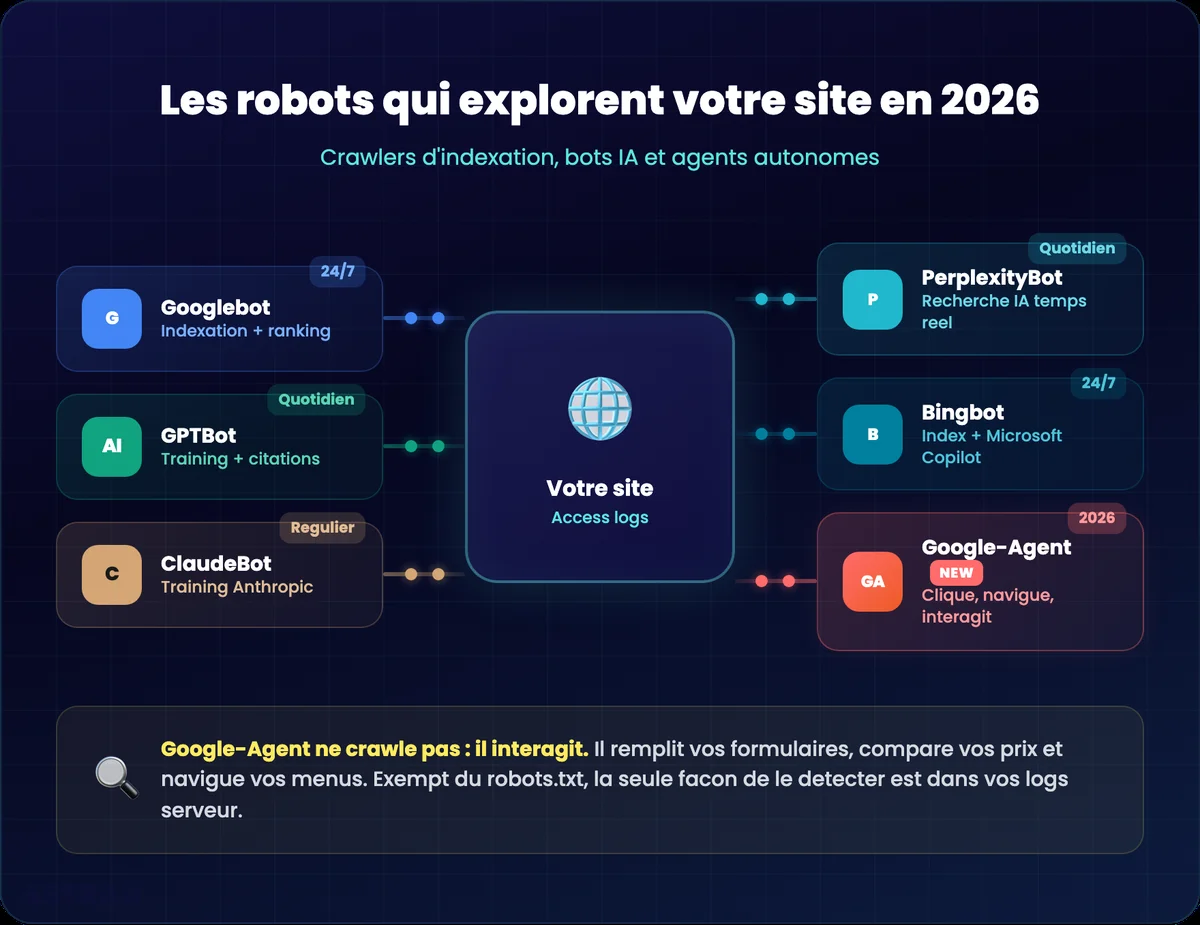
Googlebot and Classic Indexing Crawlers
Googlebot remains the main bot to monitor for SEO. It comes in two versions: Googlebot Desktop and Googlebot Mobile (smartphone). Since the switch to mobile-first indexing, the mobile version is the reference for crawling and indexing your web pages.
Next to Googlebot, you'll find Bingbot (for Bing and Microsoft Copilot), Yandex Bot, and crawlers like Screaming Frog or Ahrefs which simulate SEO crawling. Each has its own crawl frequency and its own behavior. Identifying them in your log files is the basis of all SEO log analysis.
AI Bots: GPTBot, ClaudeBot, PerplexityBot
This is the big trend for 2026. Models of’artificial intelligence send their own robots to feed their knowledge bases. In your logs, you can now spot:
- GPTBot (OpenAI): Crawling for model training and citations in ChatGPT
- ClaudeBot Anthropic: collecting data for Claude
- PerplexityBot powers the AI search engine Perplexity
- Bingbot also plays a double role: classic indexing + feeding Microsoft Copilot
What's interesting is that Behaviors differ depending on the type of crawl. An AI bot dedicated to training doesn't visit the same pages as a bot dedicated to real-time citations. By isolating each crawler in your analytics tool, you can compare these behaviors and understand which of your content is being exploited by LLMs.
Some AI bots visit strategic sites almost daily. If your content is high quality and well-structured, there's a good chance it's already being ingested by these models. The logs will confirm it in black and white.
Google Agent: The Robot That Interacts With Your Site
March 2026, Google added a new user-agent to its official documentation: Google-Agent. And there, we're on something radically different.
Google Assistant is related to Project Mariner. It is neither an indexing crawler (like Googlebot) nor an AI training crawler (like Google-Extended). It's a AI agent that navigates and interacts with your website to accomplish a task on behalf of a user. Specifically, it clicks your buttons, navigates your menus, fills out your contact forms, compares your prices, and reads your reviews. Exactly like a human visitor, but in seconds.
We go from two types of visitors (humans + crawlers) to three types: humans, crawlers, and AI agents. And that changes everything for technical SEO.
Important point: As a «user-triggered fetcher», Google-Agent is exempt from robots.txt rules. You can't block it like a typical bot. The only way to know what it's doing on your site is to read your logs.
Léo discusses it in detail in this LinkedIn post The implications for SEO are massive. A site with poorly coded forms, buttons that lack clear labels, or navigation that's a maze will simply be ignored by the AI agent in favor of a better-structured competitor. This is the same shift as in 2015 with mobile: sites that are not «agent-friendly» will start losing opportunities.
Why do an SEO log analysis?
Optimize the crawl budget
Google assigns each site a crawling budget a limited number of requests that it will dedicate to crawling your pages. On a poorly optimized site, up to 60% of this budget can be wasted on duplicate URLs, filter pages e-commerce, unnecessary URL parameters or spider traps (infinite loops).
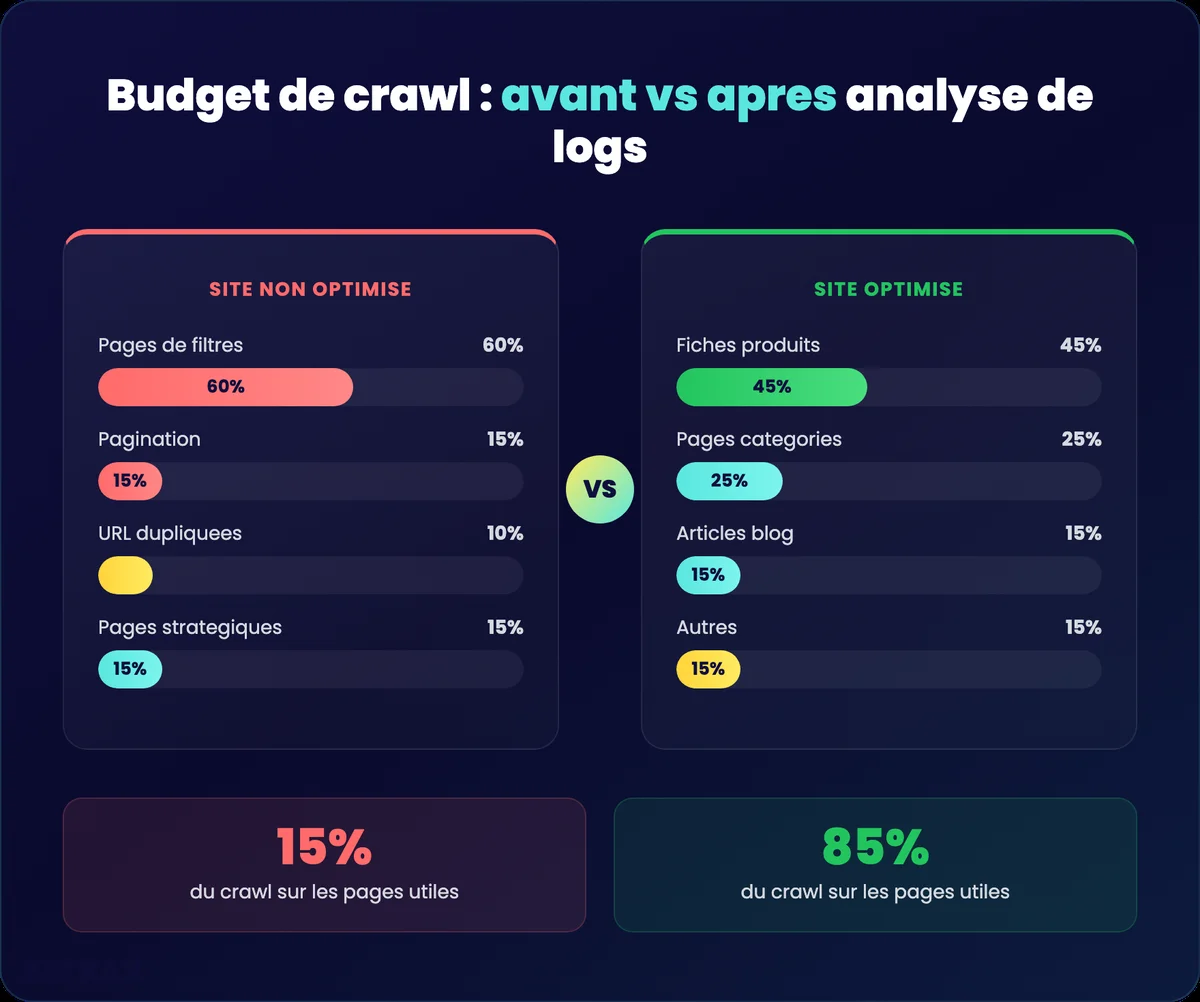
Log analysis shows you exactly where Google spends its time. Let's take a concrete example: an e-commerce site with 50,000 products and 200 filter combinations per category. The logs reveal that Googlebot spends 70% of his time on the filter pages (sorted by price, by color, by size) and only 15% on the product pages. The remaining 15%? Pagination pages. Result: your strategic product pages receive 50 bot visits per day while your filters receive 10,000. Without the logs, you never see that.
The objective: display 80% of the crawl on pages that generate organic traffic. To achieve this, you will identify waste sources in the logs (facets, parameters, spider traps) and address them via robots.txt, meta noindex, or canonical tags.
For high-volume e-commerce sites, crawl budget management is clearly a direct business lever. fast server response time (low TTFB) facilitates better passage for robots – it's a technical indicator to monitor in your logs. A TTFB greater than 500ms slows down crawling: Google sends fewer requests to avoid overloading your server. As a result, your new pages take weeks to be indexed.
Detect invisible technical errors
Mistakes 4xx and 5xx errors on important pages are silent killers. An intermittent 500 error on your homepage? Google Analytics won't tell you. Search Console might flag it in 3 days. Your logs show it to you. in real time.
Key response codes to identify:
- 404 on pages that receive backlinks (loss of SEO juice)
- 500/503 intermittent (the server crashes under the crawl load)
- 301 in a row (successive redirections that dilute authority)
- Soft 404 Pages returning a 200 code but displaying empty content
Lift the technical brakes holding back your SEO
Indexing, speed, JS, schema, crawl: we're unlocking it all.
Find orphaned and ignored pages
Strategic content that is Never crawled by Google or AIs, This is content that doesn't exist for search engines. Log analysis reveals these ignored pages, which often signals a Internal meshing problem No links point to them, so bots can't find them.
Concrètement, you can have a high-value blog post, optimized for a strategic keyword, but if no page on your site links to this article, Googlebot may never find it. It appears in your sitemap, but Google doesn't systematically crawl all the URLs in the sitemap. Internal linking remains the strongest signal for guiding robot crawling.
Conversely, you may discover that orphan pages (not linked within your architecture) are still crawled thanks to external backlinks. This is useful to know: it means these pages have incoming authority that you could better redistribute. Log data combined with a Screaming Frog crawl provides a complete view of your Analyze web On one hand, the pages that Google visits, on the other hand, the pages your architecture proposes. The difference between the two is your action plan.
Monitor aggressive crawling and server load
Some bots crawl aggressively and can overload your web server. An unusual spike in requests – for example, an AI bot sending 50,000 requests in one hour – can slow down your site for real users and degrade your Loading times.
Logs let you identify these spikes, find out which bot is responsible, and take action: adjust the crawl-delay in your robots.txt, contact the bot's operator, or strengthen your hosting infrastructure.
Measuring the real impact of a migration or overhaul
During a site migration or technical redesign, logs provide a raw and factual data on the passage of the robots. You see in real-time if Googlebot discovers the new URLs, if the redirects are working, if errors appear on the old addresses.
Typical example: you're migrating 500 URLs from an old CMS to WordPress. Within 48 hours of setup, your logs show you exactly how many of those 500 new URLs have been crawled, if the 301s are correctly redirecting to the right destinations, and if any old URLs are generating 404 errors. Without logs, you wait 2 to 3 weeks that Search Console reports errors – and meanwhile, you're losing organic traffic.
Unlike third-party tools that take days to reflect changes, log files give you immediate feedback. For the SEO specialists Those who manage technical updates, it is an indispensable decision-making tool.
Ultimately, the goal of log analysis is to facilitate the «digestion» of information by search engines and AIs. Every query Google sends to your site has a computational cost. The easier you make its job (fast pages, clear architecture, no waste), the more it dedicates its budget to pages that matter for your business. It's the same logic for AI bots: a well-structured site, with accessible content and clean data, will be better exploited by artificial intelligence models.

A secure migration, without traffic loss
Redirection plan, pre/post-launch monitoring, SERP monitoring.
How to do an SEO log analysis step by step?
Step 1: Retrieve server access logs
The log files are on your web server. On Apache, they are generally in /var/log/apache2/access.log. On Nginx, in /var/log/nginx/access.log. If you are on shared hosting, you will have to ask your host or system administrator for them.
Get at least 30 days of logs to have a representative sample. For a complete SEO audit, 3 months of data allow for the identification of seasonal trends and changes in bot behavior.
Watch the format: check that your logs contain the user-agent (Identify the robot), the Response code HTTP and the response time. Without this information, the analysis loses a significant portion of its added value.
Step 2: Import into a specialized tool
Let's be honest: analyzing raw logs in a text editor is possible, but not very useful for most projects. Using a Dedicated analysis tool saves you considerable time.
Screaming Frog Log File Analyzer is the recommended tool for the majority of cases. You create a new project, drag and drop your log files into the interface, and the tool automatically structures all the data. At 129 euros per year, the value for money is clearly the best on the market.
For lower-volume sites, Seolyzer (French tool, starting at 39 euros/month) is an effective alternative with many interesting features. For very large budgets and massive e-commerce sites, Oncrawl is considered one of the best SEO tools for cross-referencing crawl and log data.
Step 3: Filter and verify user agents
Critical step. In your tool, filter user-agents to specifically choose the bots you want to analyze: Googlebot, Bingbot, GPTBot, Google-Agent.
And above all: Close the «Verify Bots When Importing Logs» option» (in Screaming Frog Log File Analyzer). Why? Because a large number of spam bots are impersonating Googlebot. Without verification, you're analyzing fake traffic and your results are completely biased.
How does it work in concrete terms? The tool performs a reverse DNS lookup on the bot's IP address. If the request claims to come from Googlebot but the IP doesn't match Google's official ranges (crawl-*.googlebot.com), it's spam. This check is essential: on some sites, up to 30% of requests identified as «Googlebot» are actually fake bots who pollute the data. Imagine the decisions you would make with false data.
For AI bots (GPTBot, ClaudeBot, PerplexityBot), verification is more recent but just as useful. OpenAI and Anthropic publish their official IP ranges, which helps distinguish legitimate crawlers from those impersonating them.
Step 4: Analyze robot by robot
The classic mistake is to look at all the aggregated data. By isolating each crawler individually, can you compare the behaviors:
- Googlebot Mobile vs. Desktop Does the mobile version crawl the same pages?
- GPTBot vs. Googlebot Does AI show interest in the same content as a search engine?
- Google Agent Which pages interact with this agent? What forms is it trying to fill out?
- Training bots vs. citation bots the data show very different behaviors
A concrete case we often see with our clients: GPTBot massively crawls blog articles (long, informative, data-rich content) but ignores commercial pages. Googlebot, on the other hand, spends more time on transactional pages. By combining the two, you understand that your informational content feeds AI while your business pages feed the classic index. Two distinct SEO strategies, visible only in logs.
This granularity is what makes the Added value of SEO log analysis compared to a simple classic technical audit.
Toutes les agences ne la proposent pas : notre classement des agences d’audit SEO indique lesquelles l’incluent.
Step 5: Leverage Key Reports
Once the data is structured, focus on these reports:
Overview : watches the global crawl volume and the day-by-day activity curves. A sudden change (increase or decrease) signals an anomaly to investigate – an algorithmic update, a server issue, or a change in your robots.txt.
Most crawled URLs Identify which pages bots visit the most. If your e-commerce filter pages receive more crawls than your product pages, your The crawl budget is poorly distributed.. Conversely, identify strategic content that has never been crawled.
Response codes Searches for 4xx and 5xx errors on important pages. A page that returns a 404 or 500 code to the bot is content invisible for indexing and for AI model training.
Aggressive crawl Identifies unusual request spikes. A bot sending a massive number of requests in a short period can degrade your site's performance for real users. For example, some AI bots send bursts of requests without respecting a crawl-delay. In the logs, this is immediately visible: 5,000 requests in 10 minutes from the same IP. If your web server isn't sized to handle this load, loading times will explode for everyone.
Which tools should you use to analyze SEO logs?
| Tool | Price | Strengths | For whom? |
|---|---|---|---|
| Screaming Frog Log File Analyzer | 129 euros/year | Best value for money, bot verification, clear interface | SMEs, agencies, consultants |
| Seolyzer | 39 euros/month | French tool, real-time monitoring, numerous features | Medium-volume sites |
| Oncrawl | 1k - 5k | Crawl data + logs cross-referencing, full SaaS, machine learning | E-commerce, large sites |
| Botify | 1k - 5k | Complete suite, long history, advanced data analysis | Large accounts, enterprises |
| ELK Stack | Open source | No volume limits, total customization | Massive sites (8M+ pages), technical teams |
Screaming Frog Log File Analyzer remains the default choice for most projects. Its big advantage: the built-in bot check, cross-referencing with Screaming Frog crawl data (you import your crawl and logs into the same tool), and an interface that provides actionable reports in a few clicks. For 129 euros per year, it's clearly a no-brainer.
Seolyzer is characterized by its real-time monitoring You connect your logs and see the crawl in real-time, without waiting for a batch import. It's a French tool, well-maintained, with a «plug and play» approach that's suitable for sites with medium volume. The dashboard is intuitive, and the aggressive crawl alerts are a real plus.
Oncrawl is the solution for large e-commerce sites. Its strength: the automatic cross-referencing of crawl data, logs, and analytics. You can segment your pages by type (product sheets, categories, blog), by depth, by number of internal links, and see crawl metrics for each segment. The integrated machine learning identifies patterns that you wouldn't see manually. It's an investment, but for sites with hundreds of thousands of pages, decision-making is much faster.
For sites with very high volume (several million pages), traditional tools on Excel or desktop software are not always sufficient. Some Linux command-line methods (grep, awk, sed) or solutions like ELK Stack (Elasticsearch + Logstash + Kibana) enable processing large amounts of data without limitations. It's more technical to set up, but it's a powerful tool for marketing and technical teams that need large-scale data analysis. On a site with 8 million pages, Screaming Frog will struggle – the ELK Stack ingests logs continuously without faltering.
How often should SEO logs be analyzed?
The frequency depends on the size of your site and your goals. Here's what we recommend at Astrak:
- Small showcase website At least one analysis per year, ideally during an annual SEO audit.
- E-commerce site or media : every quarter, or even every semester. The volume of pages and frequent updates justify closer monitoring.
- After a migration or redesign. Systematic analysis in the days following implementation. This is non-negotiable.
- In case of indexing anomaly As soon as you notice an unexplained drop in traffic or problems in Search Console, logs give you the answer.
- For AI bot tracking : at least every 6 months. With the emergence of Google-Agent, GPTBot, and others, you need to regularly monitor how these new bots interact with your site.
On massive structures (example: 8 million pages), log analysis can take several weeks of work. But it's essential for optimizing the crawl budget and ensuring Google doesn't waste its efforts on useless pages.
An important point: with the arrival of Google-Agent and AI bots, crawling frequency will mechanically increase. These new robots change their behavior with each model update. GPTBot wasn't crawling the same pages in January 2026 as in March 2026. Tracking this evolution means understanding how your content is perceived and used by AIs—an issue of visibility that didn't exist two years ago.
SEO log analysis transforms insights into actionable data. The interest is clear: whether you are looking for the optimization of your SEO, to understand how AIs exploit your content, or to detect technical problems that your usual tools do not see, your server log files contain the answers. You just need to read them.