


A redirect plan is a Strategic and technical document essential for any website migration, redesign or URL structure change. Its role: to organize the transition from old URLs to new ones via 301 (permanent) redirects to transfer SEO authority, avoid 404 errors, and preserve organic traffic. Without a redirection plan, a migration can cause traffic to drop. 50 to 80 % in a few days. This guide details the complete, step-by-step method.
A site redesign without a redirection plan is like moving without giving out your new address. Your customers (and Google) will keep knocking on the old door and find nothing. Every old URL that returns a 404 error is a Lost backlink, a negative user signal, and a bit of PageRank evaporating.
In 2026, failing migration projects will all have one thing in common: the redirection plan was treated as a secondary task, relegated to the end of the project. Content creation or technical implementation falls behind, the site remains in an unstable state for months, and organic traffic collapses.
This guide provides you with the complete method for building a solid redirection plan, from URL inventory to post-migration verification, including tools, pitfalls to avoid, and advanced techniques.
Why implement a redirection plan?
Transfer SEO Authority (PageRank)
301 redirects allow you to pass along the «accumulated link juice from the old page to the new one. Without this redirection, all the PageRank accumulated over months or years of netlinking is lost forever.
A properly implemented 301 redirect transfers approximately 90 to 95 % juice. This is a minimal loss compared to the 100 % loss of a 404 page. Each external backlink pointing to an old URL must be redirected to the most relevant corresponding page on the new site.
Avoiding 404 errors: the number 1 enemy of a migration
A URL that disappears without redirection returns a 404 error. The consequences are multiple:
- Degraded user experience : The visitor lands on a dead page, they leave the site.
- Negative signal for Google A spike in 404 errors is interpreted as a sign of a poorly maintained site.
- Lost backlinks external links point to nothing, PageRank is wasted.
- Loss of positioning Pages that ranked well are disappearing from the index.
Force reindexing
In some cases, changing a URL and implementing a 301 redirect can Force Google to reconsider a piece of content which struggled to be indexed or had been de-indexed. The change of URL forces the algorithm to re-process the page and recalculate its relevance.
Exploiting expired domains
An advanced strategy is to buy back expired domain names having a strong history of links to redirect them to its own site. This makes it possible to benefit from the link equity accumulated by the old domain. This is a powerful netlinking technique when executed well.
Types of Redirection: 301, 302, and Others
| HTTP Code | Type | PageRank Transfer | Usage |
|---|---|---|---|
| 301 | Permanent redirect | Yes (90-95 %) | Migration, redesign, permanent URL change |
| 302 | Temporary redirection | No | Maintenance, A/B test, page temporarily moved |
| 307 | Temporary Redirect (HTTP/2) | No | HTTP/1.1 302 Found |
| 308 | Permanent Redirect (HTTP/2) | Yes | 301 Equivalent in HTTP/2 |
| Meta refresh | Client-side redirection | Partial | To avoid in SEO (slow, unreliable) |
| JavaScript | Client-side redirection | Not guaranteed | To avoid in SEO (Google may not execute it) |
For an SEO migration, use exclusively 301 redirects. This is the only one that guarantees the transfer of link authority. A common mistake: using a 302 (temporary) instead of a 301 (permanent). With a 302, Google does not transfer PageRank because it considers the move to be non-definitive.
How to create a step-by-step redirection plan
Pour un site de grande taille, comparez aussi les agences spécialisées dans notre classement des meilleures agences de migration SEO.
Step 1: Crawl the entire old website
Before any modifications, you must have a Complete inventory of all existing URLs. Use:
- Screaming Frog Crawl the entire site to list all URLs, their HTTP status, titles, and internal backlinks. This is the reference tool for this step.
- Google Search Console Export the «Pages» report to identify all URLs indexed by Google.
- Sitemap XML Verify that all pages from the sitemap are included in the inventory.
- Google Analytics Identify the pages that generate organic traffic. These are the top priorities for the redirection plan.
Sort URLs by priority :
- Priority 1 Pages that generate organic traffic AND have backlinks. 301 migration mandatory.
- Priority 2 Pages with backlinks but low traffic. 301 migration recommended.
- Priority 3 Indexed pages without traffic or backlinks. Redirect to the most relevant page or parent category.
- To delete Pages EN duplicate content, Thin content pages, outdated pages. Redirect to homepage or delete with 410 (Gone).
Step 2: create the mapping file
The core of the redirection plan is a CSV file (or spreadsheet) with at least these columns:
| Current URL | Future URL | HTTP Status | Priority | Monthly traffic | Backlinks |
|---|---|---|---|---|---|
/old-page-1 |
/new-page-1 |
301 | P1 | 1 250 | 15 |
/old-page-2 |
/new-page-2 |
301 | P1 | 890 | 8 |
/page-obsolete |
/parent-category |
301 | P3 | 12 | 0 |
/duplicate |
/homepage |
301 | P3 | 0 | 0 |
The golden rule: each old URL must point to the most relevant and similar page on the new site. Don't redirect everything to the homepage – Google considers this a «soft 404» and doesn't transfer PageRank.
Step 3: Check the quality of the matches
For each line of the file, check:
- Thematic relevance Does the old page and the new page discuss the same topic? Redirecting a page from «sports shoes» to «t-shirts» makes no sense.
- No redirect chains Check that the future URL is not itself redirected to another URL. Redirect chains (A → B → C) dilute PageRank and waste crawl budget.
- No loops Page A should not redirect to B, which redirects to A.
- The future URL exists and returns a 200 A redirect to a page that doesn't exist yet is useless.
Step 4: Implement redirects
According to the technical infrastructure:
On Apache (.htaccess)
RewriteEngine On
# 301 Page-by-Page Redirects
Redirect 301 /old-page-1 https://site.com/new-page-1
Redirect 301 /old-page-2 https://site.com/new-page-2

# Pattern (regex) redirection
RewriteRule ^old-directory/(.*)$/new-directory/$ 1 [R=301,L]
On WordPress
Use the plugin Redirection (free, handles CSV imports) or Rank Math which integrates a native redirect manager.
On Nginx
server {
    # 301 Redirects
    rewrite ^/ancienne-page-1$ /nouvelle-page-1 permanent;
    rewrite ^/ancienne-page-2$ /nouvelle-page-2 permanent;
}
With a dedicated tool (Fasterize, Cloudflare)
For infrastructures without a traditional CMS or with thousands of redirects, tools like Fasterize allow for the management of massive redirection plans via a simple CSV file. Import and updates happen in seconds, with no developer intervention.
Step 5: Test before going live (acceptance testing)
Recipe development is the most often rushed step, yet it is the one that saves migrations:
- Test each redirection manually (at least priorities 1 and 2) with the extension Link Redirect Trace.
- Crawl the site in pre-production with Screaming Frog to check that all redirects are working.
- Check redirect chains No URL should take more than one hop.
- Test the old URLs one by one they all must return a 301 to the correct destination.
- Check internal links No links from the new site should point to old URLs. All internal links should target the new URLs directly.
Step 6: Go-Live and Post-Migration Monitoring
D-Day:
- Upload the redirects at the same time as the new site.
- Submit the new XML sitemap in Google Search Console.
- Request indexing key pages via Google Search Console.
- Monitor daily for 4 weeks :
- Google Search Console 404 errors, index coverage, impressions, CTR, rankings.
- Google Analytics Organic traffic, landing pages, bounce rate.
- Screaming Frog Weekly recrawl to detect issues.
It is normal to observe a Fluctuations in positions for 2 to 6 weeks After the migration, Google must recrawl and reindex all the new URLs. If the drop exceeds 30 % after 4 weeks, there is a problem with the redirection plan.
Errors that cause a redirection plan to fail
Error 1: Internal 301 redirects
If it is crucial to have redirects for external links, one must avoid internal 301s. A link on your own site that points to a redirected page forces Google to make an unnecessary «hop,» which wastes your crawling budget.
Solution: After the migration, do a search and replace in the database to replace all old URLs with new ones in the content and menus.
Error 2: Redirect everything to the homepage
Redirecting 500 old pages to the homepage is the easy way out. And it's catastrophic for SEO. Google detects this pattern and treats it as a «soft 404» No PageRank transfer, no SEO value preserved.
Each old URL must be redirected to the most thematically similar page.
Error 3: Lack of coordination between teams
In large companies, the redirection plan involves many stakeholders: SEO, marketing, developers, project managers. It is not uncommon for redirects authenticate or are poorly implemented due to lack of coordination.
Solution: one Unique reference file (Shared Google Sheet), a clearly identified manager, and a validation process before going live.
Error 4: Delay in content creation
Many redesign projects fail because the Content creation is falling behind. The new site is technically ready, but the landing pages don't exist yet. As a result, the redirects point to empty or non-existent pages, and the site remains unstable for months.
Solution: The content must be ready BEFORE the technical migration., not after. Plan content creation with a SEO writing team upstream.
Error 5: Redirect chains
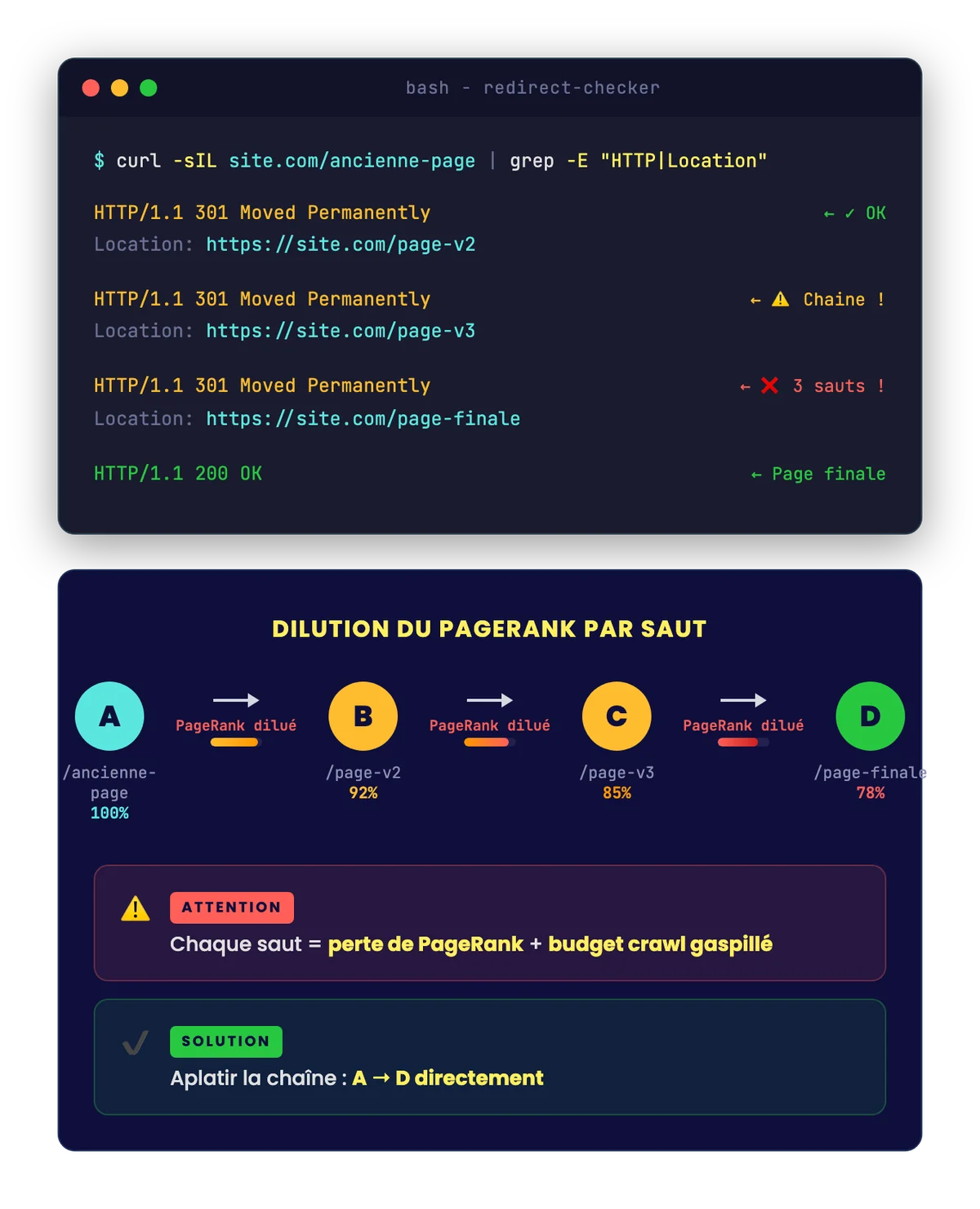
After several successive redesigns, it can happen that a URL undergoes 3, 4, or even 5 chained redirects (A → B → C → D). Each additional redirect:
- Dilute the transmitted PageRank.
- Slows down page loading.
- Waste Google's crawl budget.
- May end up being ignored by Google beyond 3 hops.
Solution: Flatten redirects. If A redirects to B and B redirects to C, modify A to redirect directly to C.

Lift the technical brakes holding back your SEO
Indexing, speed, JS, schema, crawl: we're unlocking it all.
Tools for building and managing a redirection plan
| Tool | Usage | Price |
|---|---|---|
| Screaming Frog | Crawl the site, identify all URLs, detect 404 errors, and redirect chains | Free (500 URLs) / 209 $/year |
| Google Search Console | Check indexing, detect 404 errors, submit new sitemap | Free |
| Google Analytics | Identify high-traffic pages, monitor post-migration impact | Free |
| Link Redirect Trace | Chrome extension to track redirect chains in real-time | Free |
| Plugin Redirection (WP) | Manage 301s on WordPress, CSV import, 404 monitoring | Free |
| Fasterize | Massive redirection management via CSV file without developer intervention | Variable |
| Ahrefs / Majestic | Identify backlinks on old URLs to prioritize redirects | 99+ $/month |
Comprehensive Checklist for a Successful SEO Migration
Here is the checklist to follow step by step. Each item must be validated before moving to the next.
Before migration
- Full crawl of the old site (Screaming Frog)
- Export Google Search Console Data (indexed pages, impressions, positions)
- Export Google Analytics Data (Traffic by Page)
- Backlink identification by page (Ahrefs)
- Creation of the old URL → new URL mapping file
- Checking the relevance of each match
- New page content ready and approved
- 301 redirects configured and tested in pre-production
- Internal links of the new website updated (no links to old URLs)
- New XML sitemap ready
During the migration
- Upload redirects simultaneously to the new site
- Submit New XML Sitemap to Google Search Console
- Request for indexing of the 10-20 most important pages
- Manual verification of 50+ redirects (Link Redirect Trace)
After the migration
- Daily Google Search Console Surveillance (404 errors, coverage)
- Organic Traffic Tracking in Google Analytics
- Weekly recrawl with Screaming Frog for 4 weeks
- Immediate correction of detected 404 errors
- Verification that positions stabilize within 6 weeks
- 301 redirect retention for a minimum of 12 months
A well-executed redirect plan is the difference between a migration that preserve 95 % of organic traffic and a migration that destroys it. It's a job requiring rigor, coordination, and patience. Never underestimate it.

A secure migration, without traffic loss
Redirection plan, pre/post-launch monitoring, SERP monitoring.