


URL rewriting is transform a dynamic URL into a clean and readable URL for users and search engines. But beware: The URL is not a direct ranking factor for Google. Rewriting URLs on an already indexed site carries real risks (loss of ranking, 404 errors, erased history). This guide explains when URL rewriting is relevant, how to implement it correctly with the .htaccess file, and why poor execution can destroy your SEO.
You find that your URLs contain illegible parameters like ?id=127&page=3 and your first instinct is to rewrite everything into clean URLs. Stop. Before you touch anything, there's a fundamental principle to understand: Google recognizes a page by its URL. This is its unique identifier. If you change the URL, Google considers it a new page, and all the history of the old one is lost.
In 2026, URL rewriting remains a misunderstood topic. Entire websites lose their organic traffic every month because a developer or marketer decided to «clean up URLs» without implementing the necessary 301 redirects. The result: dozens of pages in 404 error, a Google positioning collapsed and months of SEO work reduced to nothing.
This guide gives you clear rules: when to rewrite, how to do it without breaking your SEO, and in which cases it's better not to touch anything.
What exactly is URL rewriting?
URL rewriting (or URL rewriting) is a technique that consists of transforming the web address displayed in the browser bar to make it more readable and cleaner, without altering the actual page served by the server.
Concretely, the web server performs an internal transformation:
| Dynamic URL (before) | Rewritten URL (after) |
|---|---|
site.com/index.php?id=12&page=article |
site.com/articles/my-article |
site.com/product.php?cat=3&id=45 |
site.com/shoes/nike-air-max |
site.com/page.asp?rubrique=2&page=5 |
site.com/services/seo-audit |
The rewritten URL is what the user sees and what Google indexes. But on the server side, it's still the dynamic URL that is executed. The rewriting is transparent for the visitor.
URL rewriting, also known as URL manipulation or URL mapping, is a server-side technique that allows you to change the way URLs are displayed to users while maintaining the original URL's functionality. This is typically achieved by using a web server's configuration files to map user-friendly URLs to internal, often more complex, URLs that the server understands. Here's a breakdown of how it works technically: 1. **User Request:** A user types a "pretty" or human-readable URL into their browser (e.g., `https://www.example.com/products/laptops/apple-macbook-pro`). 2. **Server Interception:** The web server (like Apache, Nginx, or IIS) intercepts this request *before* it reaches the application code. This interception is handled by modules or directives within the server's configuration. 3. **Pattern Matching:** The server's configuration contains rules (often using regular expressions) that define patterns to match incoming URLs. In our example, a rule might look for a pattern like `/products/category/product-name`. 4. **URL Transformation:** When a rule's pattern is matched, the server applies a transformation to the requested URL. It essentially rewrites the URL to its internal, functional equivalent. This internal URL might pass parameters to the application. For instance, `https://www.example.com/products/laptops/apple-macbook-pro` might be rewritten to `https://www.example.com/index.php?page=product&category=laptops&name=apple-macbook-pro`. 5. **Application Processing:** The application code then receives the *rewritten* internal URL. It processes this URL, extracts the parameters (like `page`, `category`, and `name`), and serves the appropriate content. The user never sees this internal URL; they only interact with the clean, user-friendly one. 6. **Response:** The server sends the generated content back to the user's browser, using the original, user-friendly URL in the browser's address bar. **Key Components and Technologies:** * **Web Server Modules/Directives:** * **Apache:** The `mod_rewrite` module is the most common tool. It uses `.htaccess` files (directory-level configuration) or the main server configuration (`httpd.conf`) to define rewrite rules. The rules are typically written in a specific syntax (`RewriteEngine On`, `RewriteRule`, `RewriteCond`). * **Nginx:** Configuration is done in `nginx.conf` or site-specific configuration files. It uses the `rewrite` directive, often within `location` blocks. * **IIS:** Uses the URL Rewrite module, which provides a graphical interface and configuration files (`web.config`) for defining rewrite rules. * **Regular Expressions (Regex):** Rewriting rules heavily rely on regular expressions to define complex patterns for matching and capturing parts of URLs. * **Internal vs. External Resolution:** * **Internal Resolution:** The server modifies the URL *before* passing it to the application. The application is unaware that a rewrite occurred. This is the most common and effective method for SEO. * **External Resolution (Redirects):** The server receives the original URL, the application processes it, and then the server sends an HTTP redirect (e.g., 301 Moved Permanently or 302 Found) to the new, pretty URL. This is less common for primary SEO and is more for ensuring users or search engines go to the correct new location. * **Conditions (`RewriteCond` in Apache, `if` in Nginx):** Rewriting rules can be made conditional. For example, you might only rewrite a URL if a specific file doesn't exist, or if the request is from a specific domain. **Why use URL Rewriting?** * **SEO (Search Engine Optimization):** Creates more descriptive and keyword-rich URLs, which search engines prefer. * **User Experience (UX):** Makes URLs easier to read, remember, and share. * **Website Structure:** Allows for a clean separation between the user-facing URL structure and the underlying application's technical structure. * **Handling Older URLs:** Redirects old URLs to new ones after a website redesign or restructure to maintain link equity. * **Masking Dynamic URLs:** Hides complex query strings (`?key=value&key2=value2`) that can be difficult for users to understand and share. In essence, URL rewriting is a powerful server-side mechanism that acts as an intelligent dispatcher, translating user-friendly addresses into the technical routing instructions needed by the web server and application.
rewrites are done via Rewrite rules configured at the web server level:
- Apache module
mod_rewriteactivated via the file.htaccess. This is the most common method for shared hosting. - Nginx : directives
Rewriteandlocationin the server configuration file. - IIS (Microsoft) module URL Rewrite with rules configurable via the graphical interface or the file
web.config. - CMS (WordPress, Joomla, etc.) Rewriting is generally handled automatically by the CMS. WordPress uses «permalinks» which generate the .htaccess rules automatically.
Example .htaccess rule
Here is a typical Apache rewrite rule:
RewriteEngine On
RewriteRule ^articles/([a-z0-9-]+)$/index.php?page=article&slug=$ 1 [L,QSA]
This rule transforms site.com/articles/my-article at site.com/index.php?page=article&slug=my-article server-side, while displaying the user-specific URL.
Is the URL a Google ranking factor?
That's the point most articles on the subject avoid clarifying. The answer is clear:
The URL is not a direct ranking factor for Google. Google has confirmed this multiple times. Having the keyword in the URL will not make you rank better. A poorly structured URL that is already ranking is Preferable to a clean URL that was just created and who starts from scratch.
However, the URL plays an indirect role:
- For users a clean URL inspires more trust and can improve CTR in the SERP. The user who sees
/audit-seoclicks more readily than the one who sees/?p=12847. - For AIs This is an interesting point in 2026. LLMs (ChatGPT, Perplexity, etc.) use the URL as validation signal to determine if a page is about the right topic. Having the keyword in the URL can help AIs confirm the page's relevance – this is called the cost retrieval information. To learn more about AI optimization, consult our guide on Generative Engine Optimization (GEO).
- For sharing A descriptive URL is easier to share and remember.
The risks of URL rewriting: why not touch URLs that rank
Here is the golden rule:
From an SEO perspective, it's better to have a poorly structured URL that ranks than a clean URL that has just been created.
Don't go changing all the URLs on your site after reading this article. Here's why:
Google recognizes a page by its URL
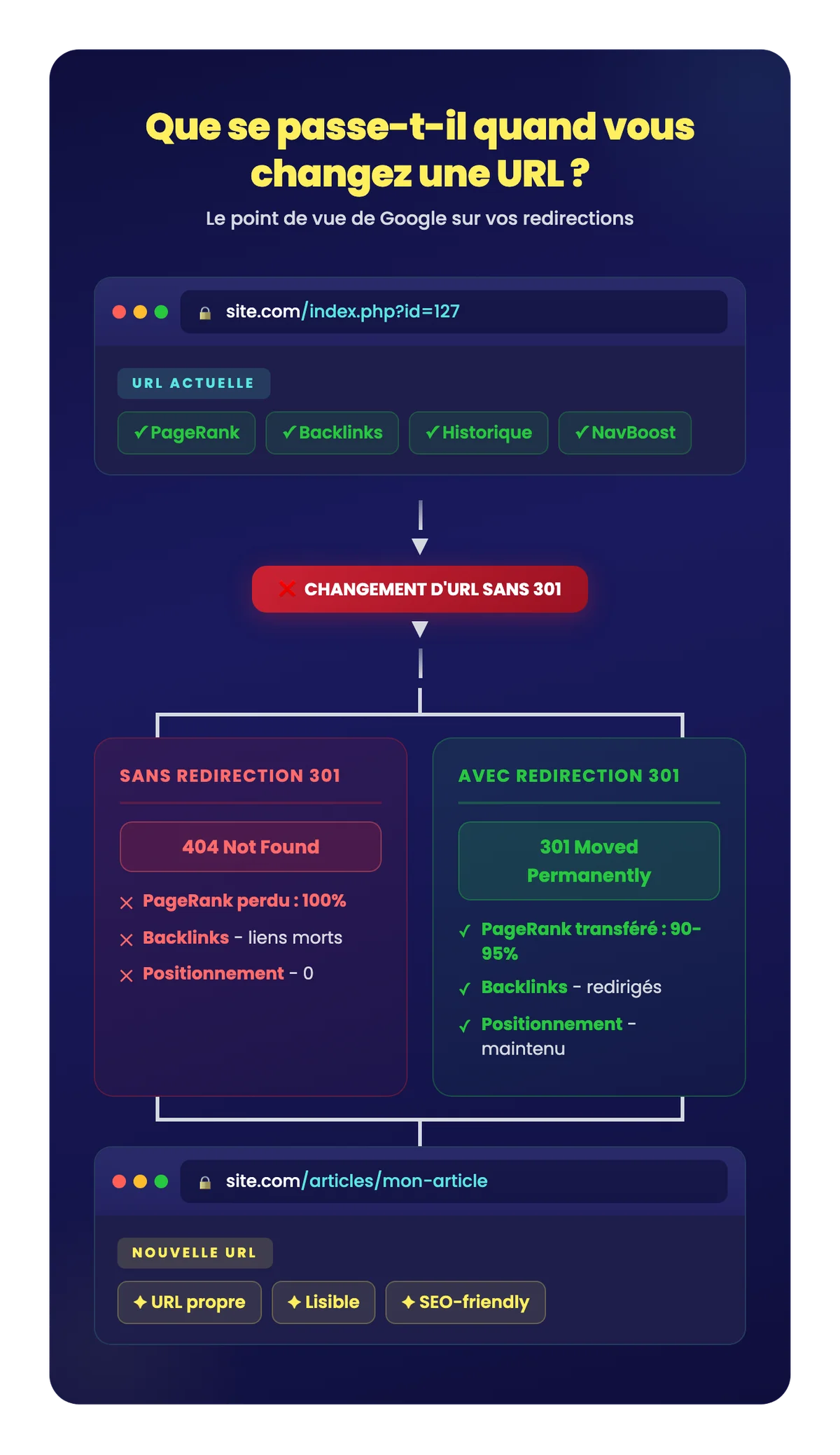
The URL is the unique identifier of a page for Google. When you change the URL:
- Google considers it a new page.
- All the history is lost Accumulated PageRank, user signals (NavBoost), page age.
- The old URL returns a 404 error if no redirection is in place.
- Visit backlinks which pointed to the old URL become broken links.
- The PageRank transmitted by backlinks is partially lost (a 301 redirect only transfers about 90-95 % of link juice).
Errors that destroy SEO
Here's what happens when you change URLs carelessly:
- Change the slug directly in the WordPress editor without implementing a 301 redirect: the old URL returns a 404, Google de-indexes it, traffic drops.
- Change hundreds of URLs at the same time Google must recrawl and reindex every new URL. The crawl budget is wasted and positions fluctuate for weeks.
- Create redirect chains URL A → URL B → URL C. Each redirect dilutes PageRank and wastes crawl budget.
- Do not update internal links even with a 301, an internal link pointing to a redirected URL forces Google to make an unnecessary jump.
URL rewriting is justified when it improves the user experience, search engine optimization (SEO), or the maintainability of a website.
Despite the risks, there are legitimate cases where URL rewriting is relevant:
Case 1: When creating a new site
If the site is not yet indexed, you have a free hand to structure your URLs properly from the start. That's the the only moment when rewriting is risk-free. Take advantage of the opportunity to:
- Use short, descriptive slugs:
/audit-seorather than/our-services/complete-natural-referencing-audit-2026. - Include the main keyword in the URL.
- Avoid visible dynamic parameters.
- Use hyphens (-) and not underscores (_).
- in all lowercase, no special characters.
Case 2: Force reindexing of a blocked page
rewriting can be a Effective strategy to force Google to reconsider a page that isn't indexing. By slightly modifying the slug (for example, by adding a plural or changing a word) and implementing a 301 redirect from the old URL, you force the algorithm to revisit the URL and recalculate its relevance.
This method also helps to avoid problems with duplicate content ensuring each unique content has its own clean and canonical URL.
This technique should be used with Frugality and method. It's not a magic shortcut. If a page isn't indexed, the problem is often elsewhere (thin content, cannibalization, insufficient internal linking). URL rewriting is a last resort, not a first instinct.
Case 3: Website Migration or Redesign
During a website redesign, the URL structure often changes (new CMS, new sitemap). In this case, rewriting is inevitable but must be accompanied by a Full 301 redirect plan. Each old URL must point to its new match.

A secure migration, without traffic loss
Redirection plan, pre/post-launch monitoring, SERP monitoring.
Case 4: Legitimate Marketing Reasons
Sometimes, marketing reasons justify a rewrite:
- Rebranding Product or service name change.
- Tree structure restructuring Reorganization of categories.
- Simplification for sharing a shorter URL for a marketing campaign.
In all these cases, the rule is the same: never change a URL without a 301 redirect.
The right process for rewriting URLs without breaking SEO
If you have identified a legitimate case of rewriting, here is the step-by-step method.
Step 1: Inventory the URLs concerned
- Export all website URLs Screaming Frog or the XML sitemap.
- Identify which are indexed and generating traffic (Google Search Console).
- Identify which ones have backlinks (Ahrefs, Majestic).
- Prioritize: Never touch a URL that ranks and generates traffic unless absolutely necessary.
Step 2: Create the mapping table
Create a CSV file with two columns:
| Old URL | New URL |
|---|---|
/index.php?id=12&page=article |
/articles/audit-seo |
/product.php?cat=3&id=45 |
/services/netlinking |
Verify that each new URL is unique, descriptive, and contains the main keyword.
Step 3: Implement 301 redirects
The 301 redirect (permanent) tells Google that the page has permanently moved. This is the only redirect that passes PageRank.
On Apache (.htaccess):
Redirect 301 /old-url https://site.com/new-urlOn WordPress: use the plugin Redirection (free) or Rank Math who manages the 301 natively.
Step 4: update ALL internal links
This is the step that 90 % of people forget. Even with a 301 in place, every internal link must point directly to the new URL. Reasons:
- Avoid redirect chains (A → B instead of A → old → B).
- Save crawling budget.
- Pass PageRank without loss.
Step 5: Check and Monitor
- Use Link Redirect Trace (Chrome extension) to verify that redirects are working.
- Watch the Google Search Console 404 errors, crawled pages, impressions, and positions.
- Check the indexing of new URLs in the following weeks.
- Keep 301 redirects for at least 12 months (ideally indefinitely).

Lift the technical brakes holding back your SEO
Indexing, speed, JS, schema, crawl: we're unlocking it all.
How to optimize slugs for SEO
The slug is the part of the URL that identifies the specific page. Here are best practices for new content:
| Best practice | Good example | Bad example |
|---|---|---|
| Short and descriptive | /audit-seo |
/our-comprehensive-seo-audit-service |
| Main keyword included | /rewrite-url |
/article-12847 |
| Dashes (not underscores) | /plan-redirection |
/plan_redirection |
| Lowercase only | /blog-seo |
Blog SEO |
| No filler words | /guide-seo |
/the-seo-guide-for-beginners |
| No parameters | /category/product |
/?cat=3&id=45 |
| No dates | SEO trends |
/2026/03/seo-trends |
For WordPress sites, configure permalinks by «Article Name» (%postname%) from installation. It's the cleanest and most SEO-friendly format.
URL rewriting is not a trivial matter. It is a technical operation that, poorly executed, can destroy months of SEO work. The golden rule: only change a URL if you have a valid reason AND a 301 redirect plan in place. If your current URLs are ugly but rank, leave them alone.