

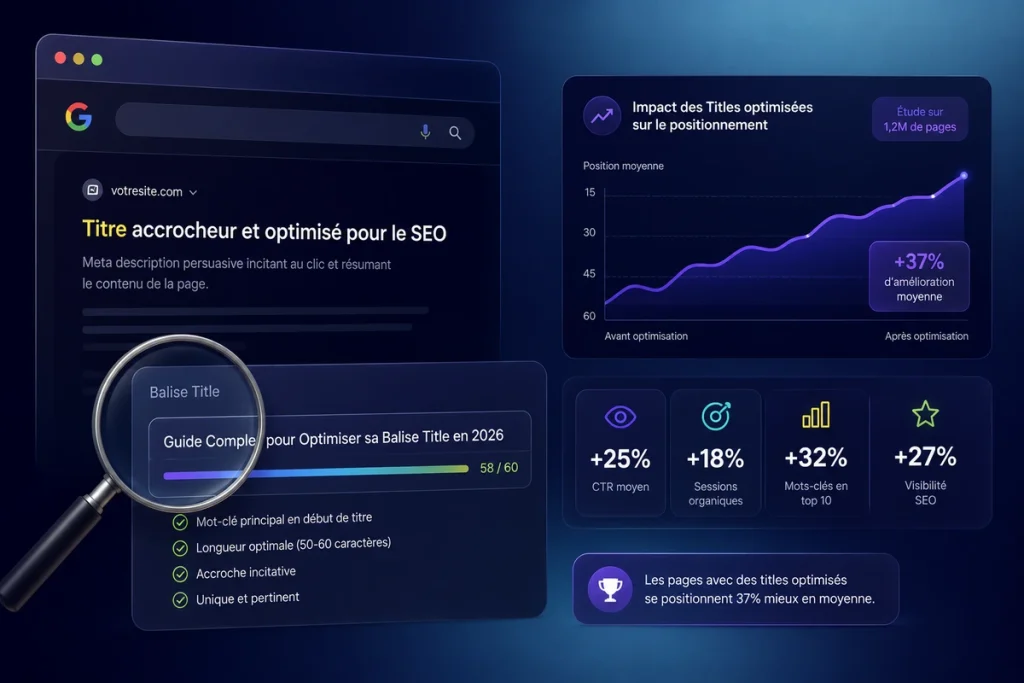
The title tag remains the 2nd ranking factor according to FirstPageSage (% 14 weighting in 2025). Place the main keyword at the beginning of the title correlates to 0.75 on 150,000 results (ThotSEO/Paul Grillet study). The sweet spot is between 40 and 60 characters (+33.3%% CTR according to Backlinko). Google rewrites 76% of the titles in 2025 (McAlpin) – but aligning your H1 and title reduces this rate to 20.6%. Each tip in this article is backed by a study with numbers.
You've just published an article. You've worked on your content, your images, your internal linking. And yet, in the Google results, no one clicks. The problem probably isn't your content, but the first thing the user sees in the SERP: your title tag.
Roughly speaking, the title tag is your pitch in 60 characters. It's what decides if a user clicks on your result or the one below it. And yet, the majority of websites treat this topic with generic advice like «put your keyword in the title.» Cool, but How much does that really impact your positions How much? With what correlation?
We've compiled data from 7 major studies – including Paul Grillet's analysis of 150,000 results via ThotSEO, Backlinko's 11.8 million results, Zyppy's analysis of 81,000 titles, and A/B tests by SearchPilot – to give you a data-driven answer to every question you have about the SEO title tag.
What is the title tag and why does Google give it so much importance?
An HTML element in the head section that directly influences your search results
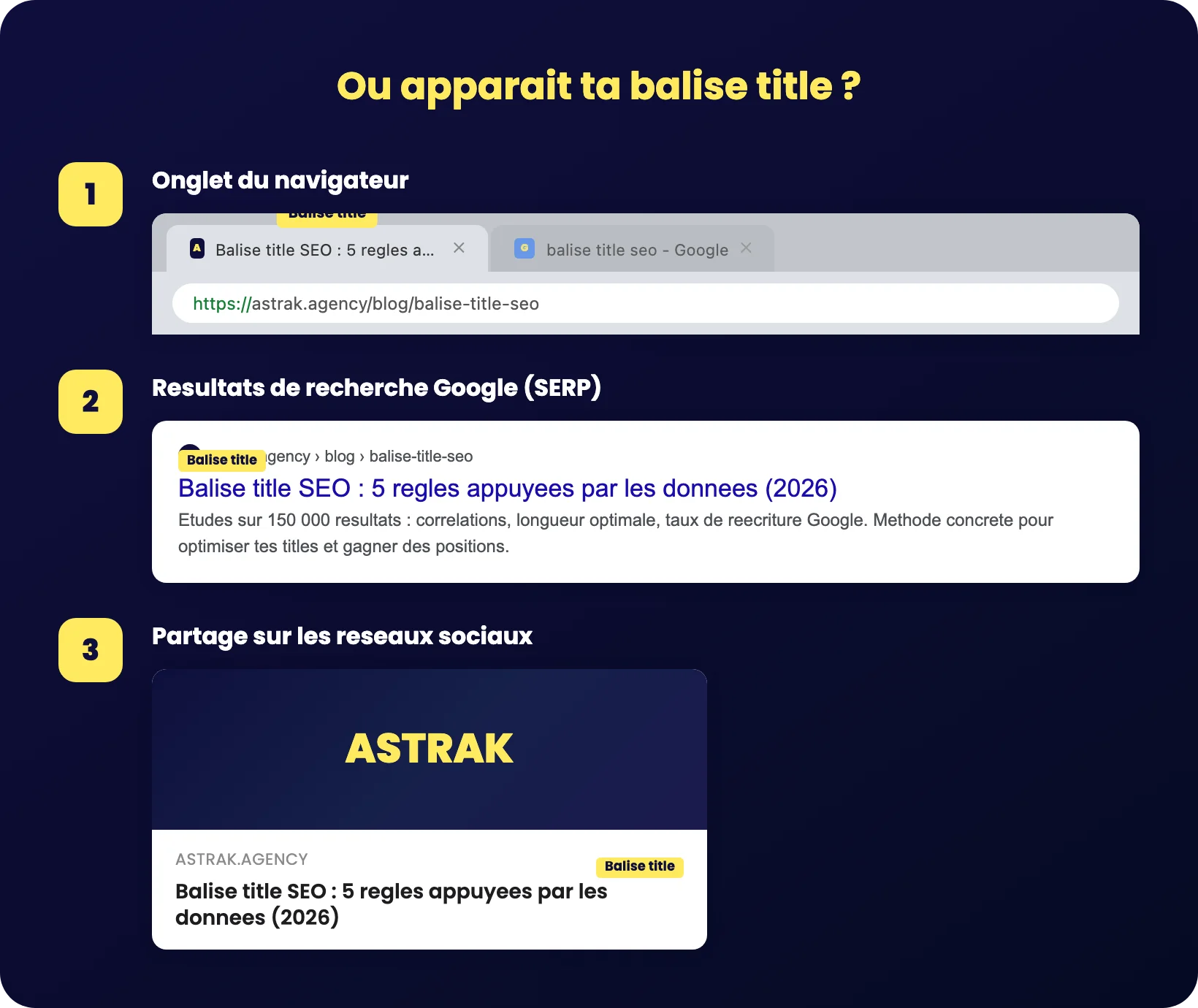
The title tag – also called title tag or SEO Title – is an HTML title element placed in the section <head> from your web page. Specifically, it's the code <title>Your title here</title> that you find in the source code of each page of your site. This Key element is displayed in three places: in your web browser tab, in Google search results (the SERP), and when someone shares your link on social media.
Google Search Central is clear on this: the content of the HTML title tag is used in more than 80% of cases to generate the title displayed in search results. It's the number 1 source search engines use to understand your page's topic and decide how to present it to users. In digital marketing, it's probably the on-page element with the best effort-to-impact ratio.
Regarding weight in the algorithm, FirstPageSage ranks «keyword in meta title tag» as the 2nd most important ranking factor in 2025, with 14% of the algorithmic weight. Only regular publication of satisfying content carries more weight. In 2024, this factor was 15% – a slight decrease that reflects the rise of user signals, but the title tag remains a pillar of natural SEO.
The difference between title tag, meta description, and H1
These three elements are often confused. Here's what each one does specifically:
- Title tag (SEO title) Visible in the SERP and browser tab. It targets search engines and clicks. This is your sales pitch in 60 characters.
- Meta description tag : the text under the page title in Google search results. The title and meta description duo forms your page's storefront in the SERP. The description doesn't directly weigh on the ranking but influences the click-through rate (CTR).
- H1 The main title visible on your page. It addresses the reader already present on your site and confirms they are in the right place.
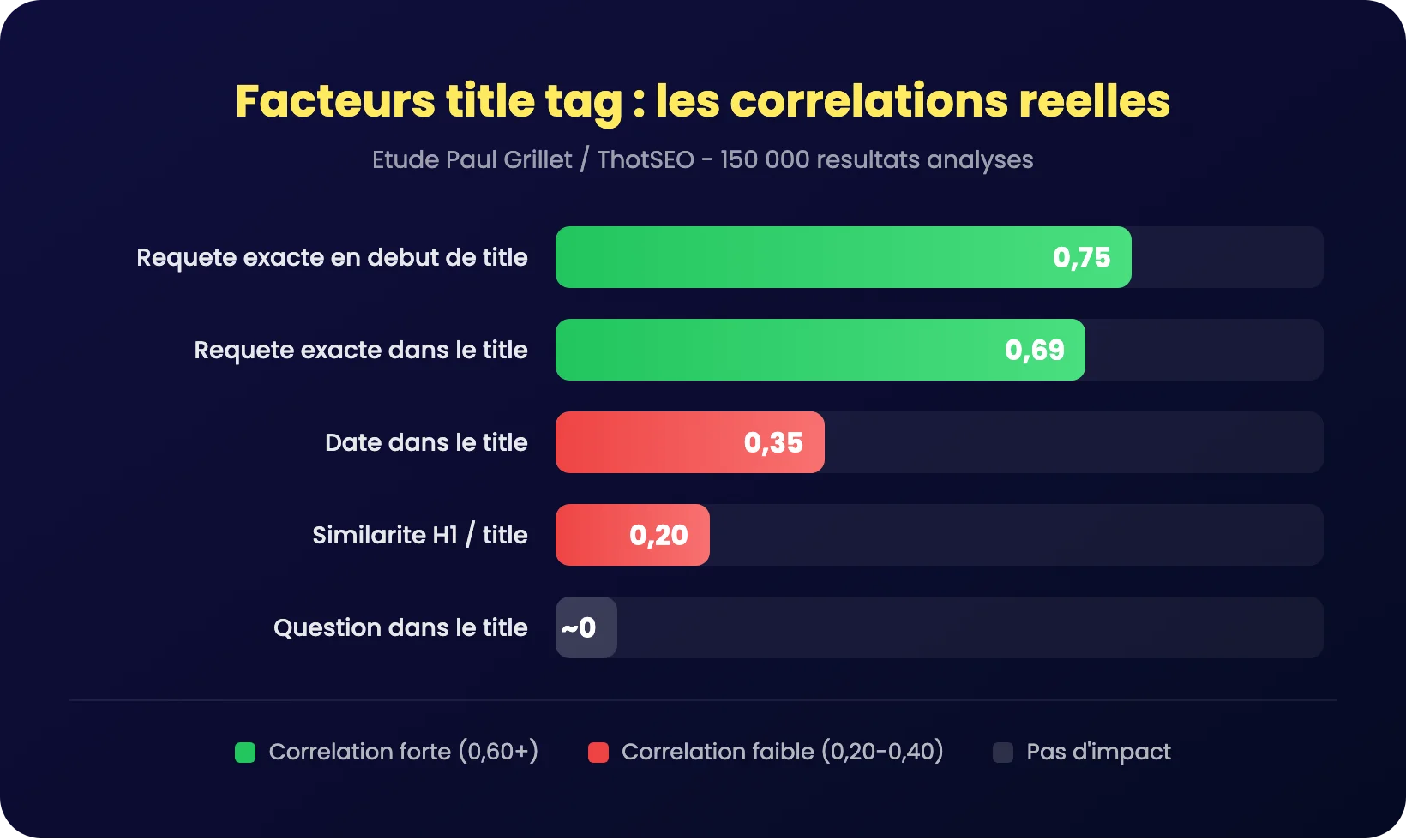
And there, the data shatters a common myth. Paul Grillet's study of 150,000 results via ThotSEO shows that The similarity between H1 and title has a correlation of only 0.2. with the positions. In other words, the page title and the title tag don't need to be identical. You can (and should) adapt each to its context: the title tag for clicks in the SERP, and the H1 for the user experience on the page.
Should the keyword be placed at the beginning of the title tag? Here's what the data says
Exact query in title: correlation of 0.69 on 150,000 results
This is the question everyone is asking in SEO. And we finally have precise numbers to answer it.
The study by Paul Grillet, conducted from all SERPs crawled by ThotSEO in 2024 (over 150,000 results analyzed), shows two clear correlations:
- Exact query in the title correlation of 0,69
- Exact match at the beginning of the title correlation of 0,75
The difference between the two (0.69 vs. 0.75) confirms what the SEO community has been saying for years: Placing the main keyword at the beginning of the title tag gives a slight extra advantage.. Léo confirms it directly, relying on the Google Leak: «exact query in the title, I know you get a boost from that.».
Backlinko corroborates this trend on a larger scale. On 11.8 million Google results, between 65% and 85% of the pages in the top 10 contain the target keyword in their title tag. The keyword in the title works as a Entry ticket for page 1 – but once in the top 10, the difference between position 1 and position 10 is only 1%.
Moz also confirms over a decade of correlation studies: titles that begin with the keyword tend to perform better than those where it is placed at the end.
Exact keyword vs. semantic variation: the nuance that changes everything
Be careful not to fall into the trap of the exact match at all costs. Leo is very clear about this in his study of 150,000 results: «If you change it a little, make a variation, it's not a problem». A correlation of 0.69 is significant, but it's not 0.95.
The Surfer SEO study on 1 million SERPs (2025) goes even further: the use of exact match keywords does not show almost no correlation with the positions. On the other hand, the semantic variations in content correlate much better with rankings.
Semrush, across 600,000 keywords, adds a layer: on-page factors (including the title) have a correlation less than 0.3 with the positions. Why? Because almost all serious websites are already on-page optimized. It's a hygiene factor: if you don't do it, you're penalized. If you do it, you're on the same level as everyone else.
The strategy that performs main keyword at the beginning of the title (correlation 0.75), then Natural and semantic variations in the rest of the title. No keyword stuffing, no forced repetition.
What's the optimal title tag length in 2026?
The sweet spot: between 40 and 60 characters (including numbers)
Three studies converge toward the same range, but from different angles:
| Study | Sample | Key result |
|---|---|---|
| Backlinko (Click-Through Rate) | 4 million results | Titles 40-60 characters = 33.3%% of CTR Above price range |
| Zyppy / Cyrus Shepard | 81,000 titles | Sweet spot 51-60 characters lowest rewrite rate (~40%) |
| John McAlpin (2025) | Analyze Q1 2025 | Titles not modified by Google = 44.47 characters on average |
McAlpin's figure is particularly telling: 84,87% of the titles that Google does not modify are within the 30-60 character range. Beyond 60, the risk of rewriting explodes. Below 20 characters, Zyppy observes a rewrite rate of over 50%.
Google doesn't just reason in terms of character count, but in pixel width (approx. 600 pixels). A title in all caps or with wide characters (W, M) will be truncated faster than a title in lowercase. But in practice, aiming for 50-60 characters remains the most reliable rule.
The error of titles that are too short
In the video about ranking factors, Léo quotes a renowned SEO expert who responded to a survey on underestimated practices: «those who leave space in titles». Basically, if you have 50 to 60 characters available and only use 30 or 35, you're wasting precious space.
These additional characters are an opportunity to add:
- One secondary keyword or a supplementary expression
- One click trigger (number, year, profit)
- The your brand name if it boosts confidence
Regarding data, Ahrefs confirms that Google is 57% more likely to rewrite excessively long titles but those within the range. But too short isn’t the solution either – it’s a balance.

Lift the technical brakes holding back your SEO
Indexing, speed, JS, schema, crawl: we're unlocking it all.
Google is rewriting 76% of title tags: how to keep yours intact?
Why Google modifies your title (and how often)
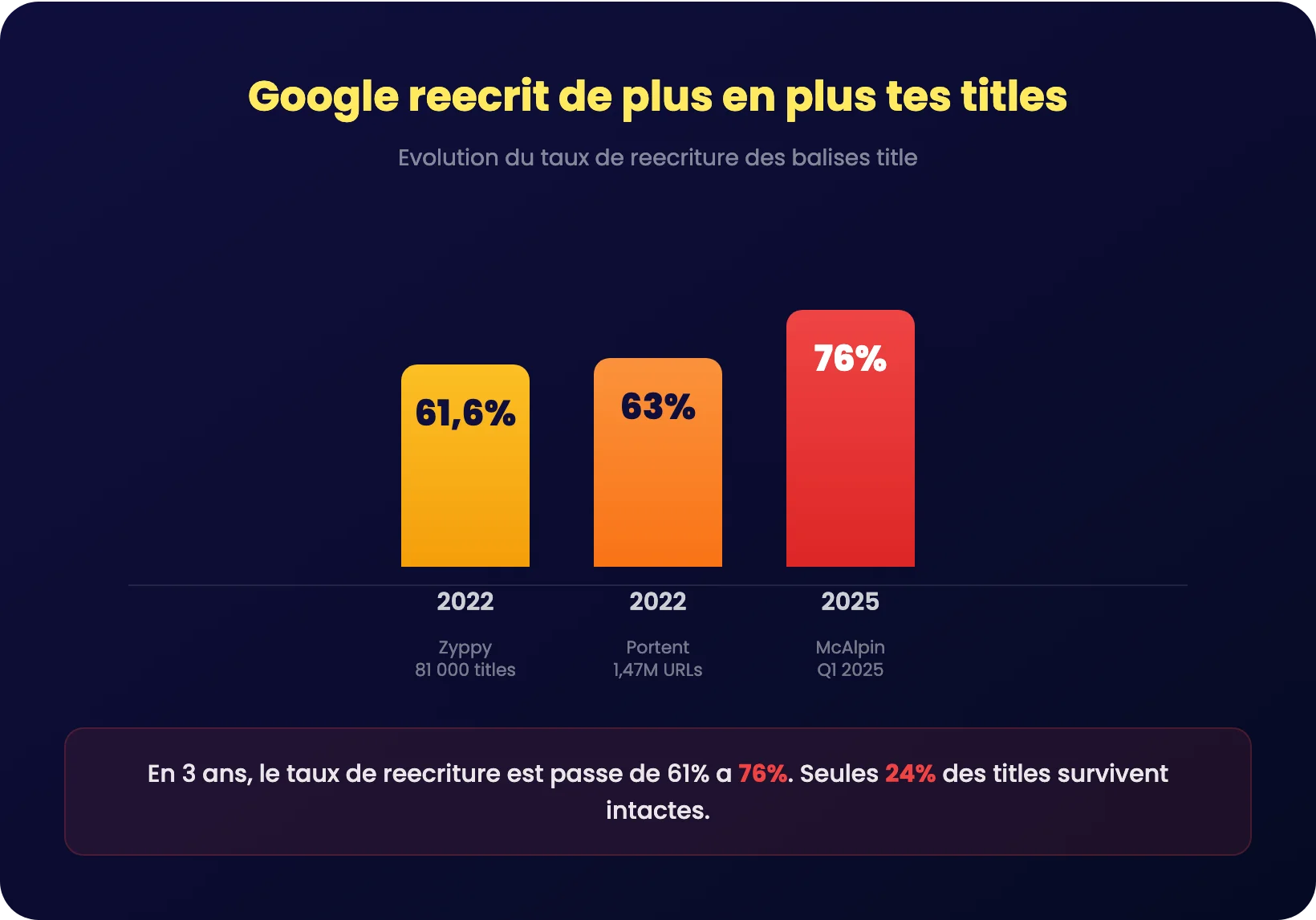
This is probably the most underestimated metric in technical SEO. You spend time crafting your title tag, and in 3 out of 4, Google modifies it before displaying it.
The evolution is striking:
| Year | Study | Rewrite rate |
|---|---|---|
| 2022 | Zyppy / Cyrus Shepard (81,000 titles) | 61,6% |
| 2022 | Portent (1.47 million URLs) | 63% |
| 2025 | John McAlpin (Q1 2025) | 76% |
In three years, the rewrite rate has gone from 61%to 76% . Google is intervening more and more. And when it rewrites, it doesn't do it subtly: on average, it only keeps 35% of original content and remove approximately 2.71 words.
The most frequent type of modification? The Brand name removal, which represents 63% of changes. Google's keyword additions represent only 1% of modifications – the search engine simplifies far more than it enriches.
Ahrefs provides a more conservative figure (33.4% rewrite) because their methodology differs. But regardless of the study, the conclusion is the same: The majority of the titles have been modified.. That's why you need to know the rules of the game.
5 concrete rules to avoid rewriting
Zyppy and McAlpin studies help identify clear patterns on what protects (or exposes) your title to rewriting by Google.
Align your title tag and your H1
It's the most powerful lever. When the title and H1 are aligned (not necessarily identical, but coherent), the rewrite rate drops to 20,6% against 76% on average. Google interprets title/H1 consistency as a quality signal.
Stay within the 30-60 character range
McAlpin shows that 84.87% of titles not modified by Google are in this range. Very long titles (65+ characters) are rewritten in 100 cases% according to Zyppy. Titles that are very short (1-5 characters) experience a rate of 96%+.
Use hyphens (-), not pipes (|)
Zyppy measured that Google is removing pipes (|) in 41% cases, versus only 19.7% for the dashes (-). If you separate your title from your brand name, the dash is twice as safe.
4. Avoid brackets [], prefer parentheses ()
Brackets are removed in 32% cases, parentheses in only 19,7%. If you want to add an item in square brackets like [Guide 2026], use (Guide 2026) instead.
5. Do not overload with the brand name
Since brand name removal accounts for 63% of modifications, if your name is long, consider shortening it or placing it at the end of the title with a hyphen. Google will remove it if it exceeds the displayable length. Best practices: use a short separator (hyphen or pipe) and keep the brand name last.
Always check the actual rendering of your title in the SERP. Type your target query into Google and compare what appears with what you wrote. If Google rewrites your title, it's a signal that something isn't right.
What elements in the title boost (or hurt) your click-through rate?
A/B tests that prove the impact of titles on traffic
Correlation studies are good, but A/B tests are even better. SearchPilot, RankScience, and others have isolated the impact of the title tag on organic traffic by changing only the title, all other things being equal.
| Test | Modification | Impact | Source |
|---|---|---|---|
| Travel site | Shorten titles to display prices | +29% organic traffic | SearchPilot |
| Editorial site | Updated Daily« | +11% de trafic organique | SearchPilot |
| E-commerce site | Move the mark to the beginning | +15% organic traffic | SearchPilot |
| Zapier | Title tag change | +17% organic traffic | Zapier / Wix SEO Hub |
| Coderwall | Add «(Example)» to the title format | +57% global growth | RankScience |
| Client Wix | Titles plus concise, not truncated | +9% organic traffic | Wix SEO Hub |
The most spectacular test is RankScience's on Coderwall: the simple addition of «(Example)» to the title format generated +57% growth and a continuous boost of +8% per month. Just one word in parentheses. It shows how much a well-placed clickbait element in the title can transform results.
Grit Daily also reports on cases where optimizing titles has produced +8.5% organic traffic and +2 to 3 positions On average, with some cases reaching +25% CTR over 4 weeks.
What works and what doesn't work in a title
The study by Léo and Paul Grillet on 150,000 results, combined with Backlinko's data on 4 million results, paints a clear picture:
Questions in the title
Surprising result: zero impact on ranking according to the ThotSEO study. Léo is happy to confirm it – «I'm happy, I was at the end too, so therefore zero impact.» On the other hand, Backlinko measures a +14.1% click-through rate For titles in the form of a question. Conclusion: a question won't help you climb the rankings, but it can attract more clicks once you're there.
Dates in the title
Correlation of 0,35 In the ThotSEO study—weak. Paul Grillet notes that about 3% of titles in the top 10 contain a date, even though the analyzed queries were not dated. The impact exists but remains marginal. If you put «2026» in your title, it won't work miracles, but it can signal the freshness of the content to internet users.
Figures in the title
Leo mentions that this is often recommended, and in fact the results are «interesting» without being decisive. A concrete figure («5 steps», «in 30 days») can capture the reader's attention and differentiate your result in the SERP.
Clickbait words
Backlinko measured an effect negative of -13.9% on the CTR When it comes to titles containing power words, internet users have become suspicious of overly catchy headlines. Conversely, the positive sentiment in the title generate a boost of +4 to 7.4% CTR. The nuance: inspires confidence, not hype.
Unicode symbols in the title (★, ✓, ⚡)
A technique rarely used in France: inserting a Unicode symbol into your title tag to stand out visually in the search results. Studies by Zyppy show that these symbols can increase click-through rate from 5 to 12% when they are used well. The reason is simple: on a results page where all the titles look alike, a ★ or a ✓ immediately grabs the internet user's attention.
But be careful, there's an important distinction to be made. The colored emojis (😍, 🔥, 🚀) are often removed by Google during the rewrite. On the other hand, the simple Unicode symbols (★, ✓, ⚡, ►, ✦) appear reliably in the SERP because Google treats them as classic text characters, not as superfluous visual elements.
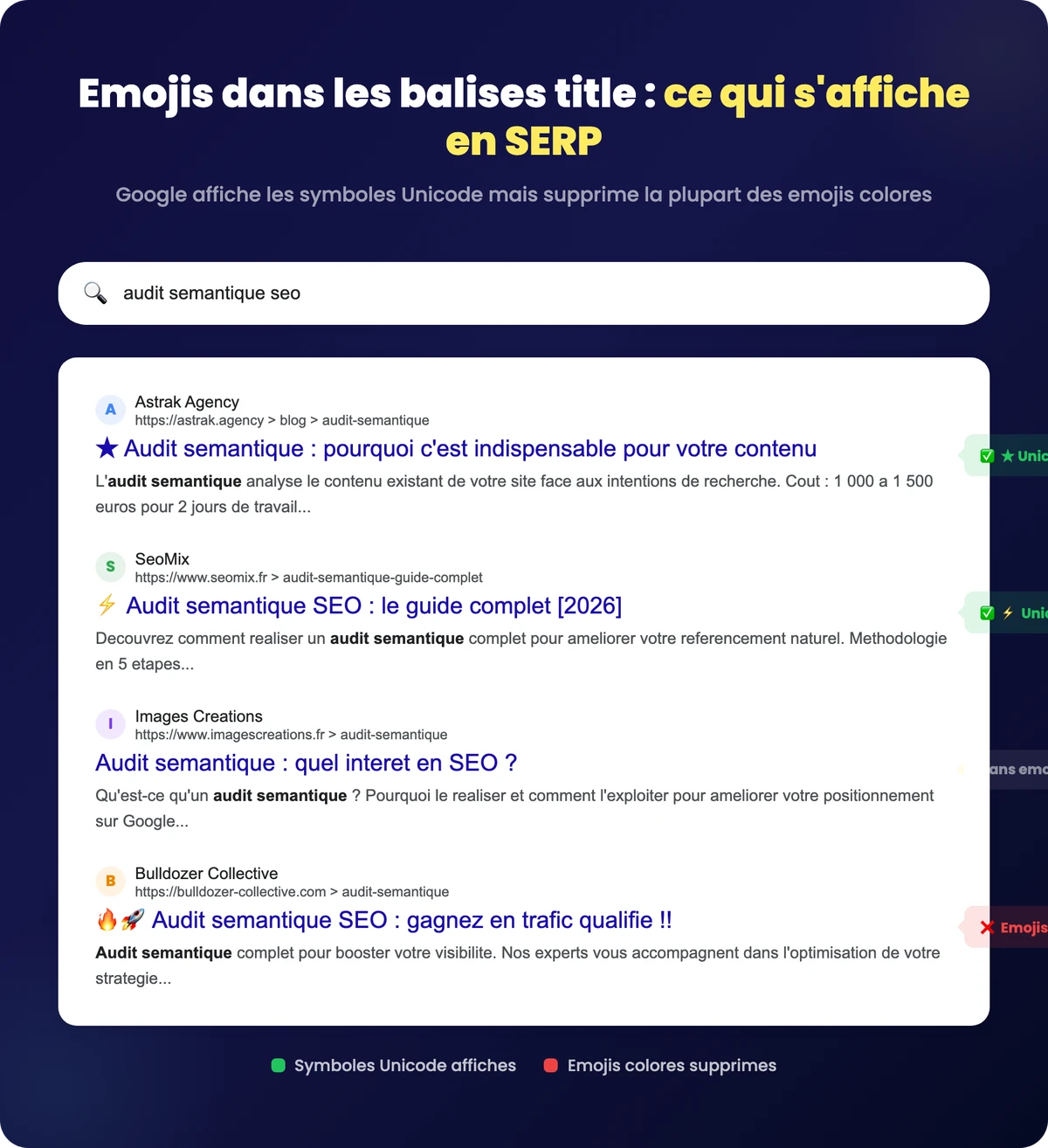
Rules to follow when using Unicode symbols in your titles:
- One symbol per title, placed at the beginning or end – never in the middle, it breaks the flow
- Favor monochrome symbols Rather than colorful emojis
- Always write a title that works without the symbol Google's rewriting system can remove it at any time, so your title needs to remain readable and relevant without it.
- Test the real rendering in SERP after publication, as some symbols display differently on different devices
How to Write an Effective Title Tag (Step-by-Step Method)
Step 1: Identify the target keyword and search intent
Before you write anything, you need to know two things: what is your main keyword, and what is the’search intent behind this request.
The same expression can have different intentions. For example, a «title tag» can mean «I want to understand what these are» (informational) or «I want a tool to optimize them» (transactional). SERP analysis: if the first 10 results are guides, Google expects informative content. If they're product pages, it's a commercial query.
The golden rule: one page = one target keyword = one title tag. Never target two different search queries in the same title. It's the best way to be relevant for neither of them. Whether it's for your homepage, your category web pages, or a blog post, each URL deserves its own title with its own target keyword.
Step 2: Build the title with the formula that performs
By cross-referencing the study data, here is the structure that maximizes both ranking and CTR:
Main keyword (start) + angle/benefit + brand (optional)
Concrete examples:
| Avant (generic) | After (optimized) | Why does it work |
|---|---|---|
| Our SEO tips for your site | SEO Title Tag: 5 Data-Backed Rules | Keyword first, number, concrete promise |
| How to improve your search engine optimization | SEO: 4-step method (+29% traffic) | Keyword at the beginning, steps, encrypted proof |
| Homepage – My Website | Paris SEO Agency: Free Audit and Custom Strategy | Target request at the start, clear benefit |
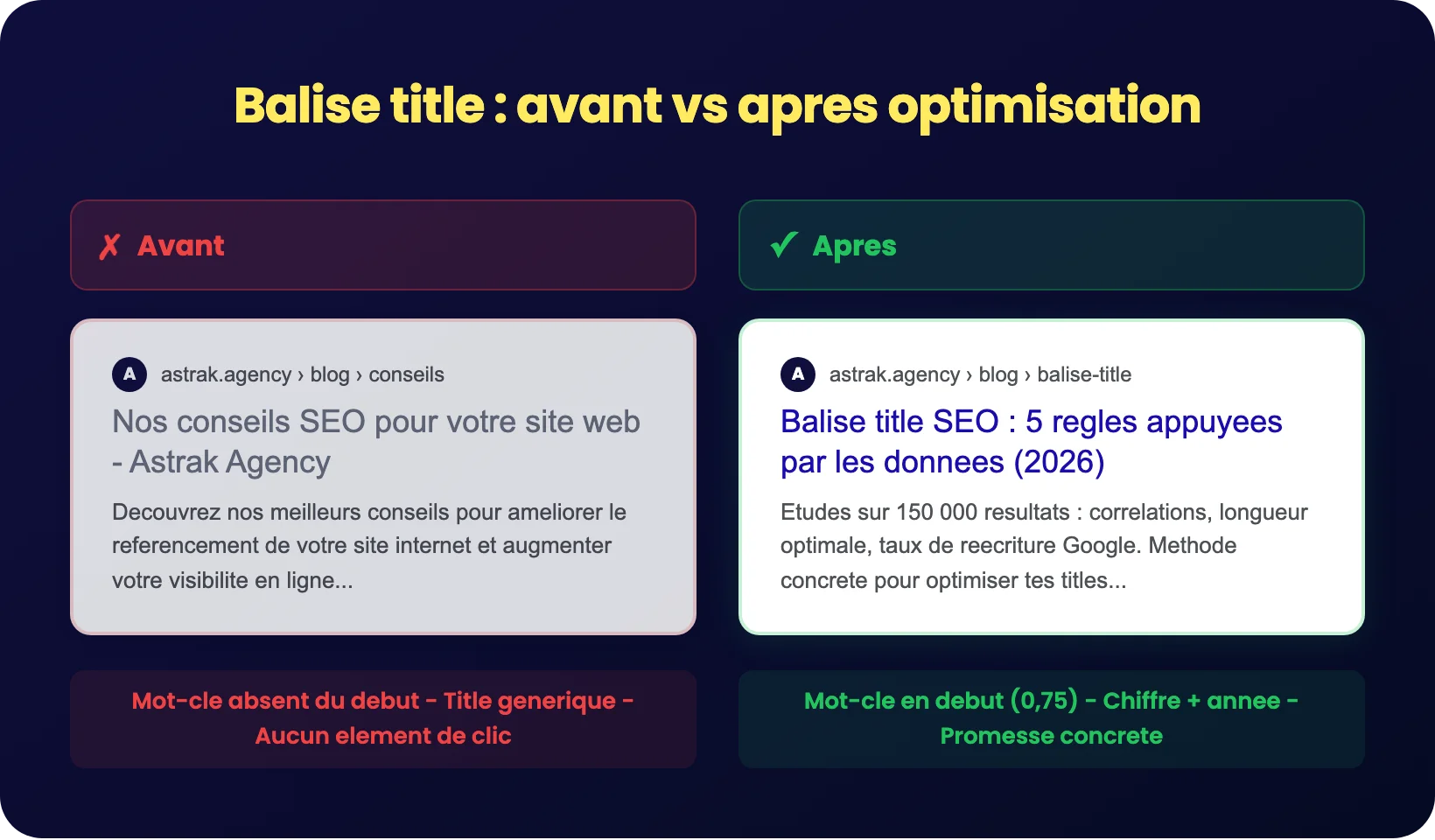
The title «before» in these examples accumulates classic errors: missing keyword or keyword at the end of the title, no benefit, no differentiating element. The title «after» places the keyword at the beginning (correlation 0.75), adds a click-worthy element without being clickbait (no power words), and stays under 60 characters.
Step 3: Check and optimize with the right tools
Once your title is written, it needs to be validated. Here are the tools that allow you to check your work:
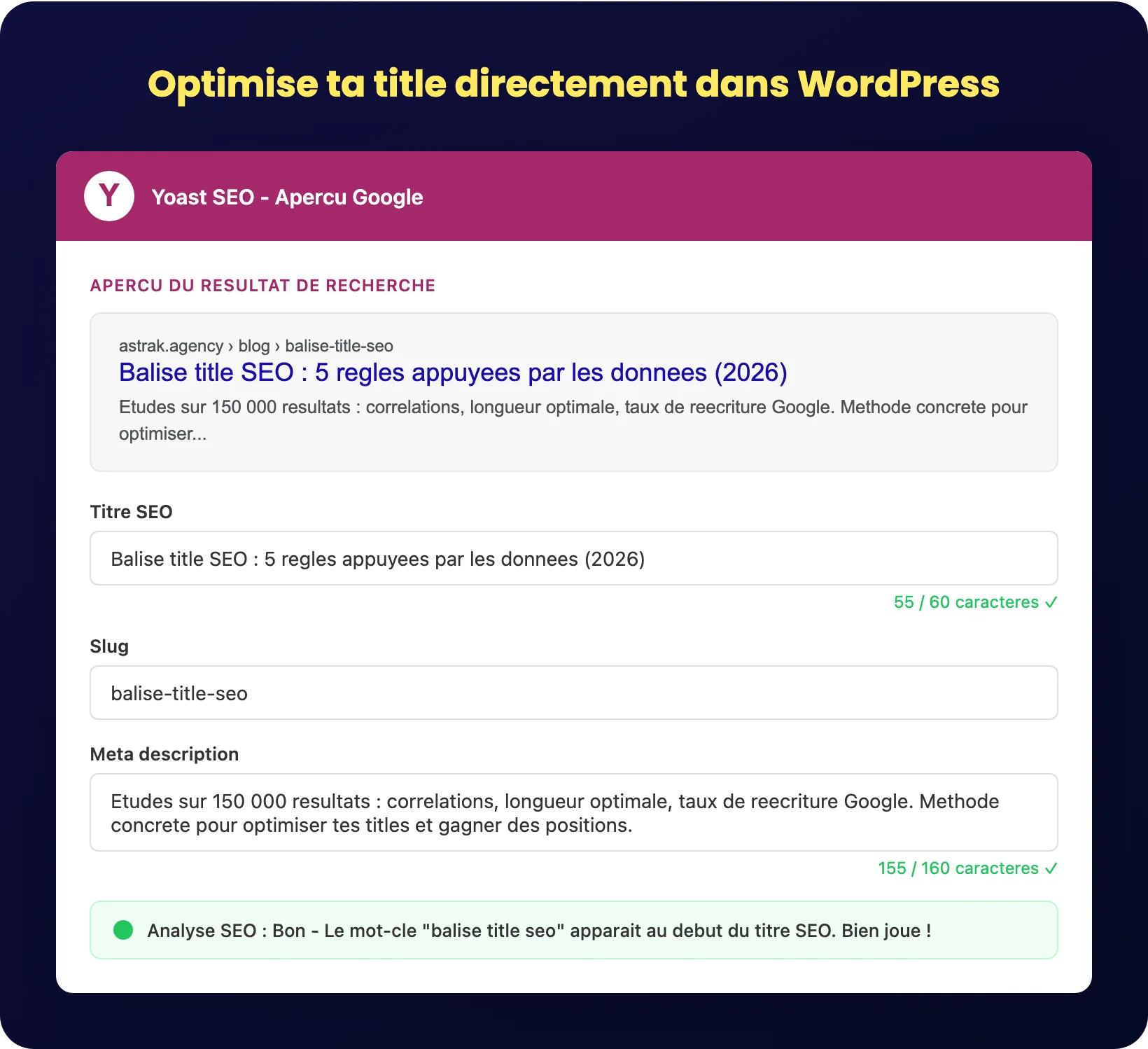
For WordPress: Yoast SEO or Rank Math let you write a title tag directly from the editor, with a real-time preview of how it will look in the SERP. These plugins warn you if the title is too long or too short, and let you manage the title tags across all your web pages without touching the code.
To simulate SERP rendering: Tools like Mangools' SERP simulator or Moz's analyzer show you exactly how your title will appear in Google search results, on desktop and mobile. Reminder: 68% of the titles are truncated on mobile Zyppy.
For a global audit: A technical SEO audit can detect duplicate, missing, or overly long titles across your entire site. Tools like Screaming Frog, Sitebulb, or Ahrefs Site Audit scan all pages and report title tag issues in minutes.
The réflexe to take: after each publication, type your target query into Google and check that the displayed title matches what you have written. If Google has rewritten it, that's the signal that an adjustment is needed (length, consistency with the H1, or page content).

Content that generates leads, not just traffic
High business impact keywords, articles that rank and convert.
The 5 most common errors with the title tag (and how to fix them)
Error 1: The same title on multiple pages
Identical titles signal duplicate or cannibalized pages to Google. Each page on your website must have a unique title tag, targeting a different keyword. If two pages target the same phrase, it's a structural problem, not a title problem.
Error 2: Keyword stuffing in the title
Google Search Central is explicit: «there is no reason to have the same words or phrases multiple times» in the title. Semrush confirms that over-optimization is detected as spam. A single occurrence of the main keyword is sufficient.
Error 3: The generic title
«Home,» «Product Page,» «Article» – these titles tell search engines and users nothing. Google explicitly recommends avoiding vague descriptors. Each title must describe the specific content of the page.
Error 4: Complete absence of title tag
It seems obvious, and yet Ahrefs points out that 7.4% of top-ranking pages have no title tag at all. When there is no title, Google generates a title from the H1 (in 50.76% of cases) or other page elements. You lose all control over your message in the SERP.
Error 5: Ignore Google Rewriter
With% of titles rewritten in 2025, not checking the actual rendering in the SERP is a mistake. You can have the perfect title in your HTML code, but if Google modifies it, it's Google's version that users see. Test this regularly on your strategic pages.